:+86-13726207043
:info@yuxun.com
- All
- Product Name
- Product Keyword
- Product Model
- Product Summary
- Product Description
- Multi Field Search

Views: 272 Author: YUXUN CABLE Publish Time: 2026-06-30 Origin: Site


Content Menu
● What Is An E‑Marker Chip In USB‑C Cables?
● How E‑Marker Chips Work Inside USB‑C Power Delivery
>> The Negotiation Process Between Devices And Cable
>> What Happens When The Cable Has No E‑Marker?
● E‑Marker vs Non‑E‑Marker USB‑C Cables
>> Key Performance Differences
● When You Actually Need An E‑Marker Cable
>> High‑Power Charging (60W–240W)
>> High‑Speed Data, USB4 And Thunderbolt
>> USB‑C Video Output And Docking
>> Professional And Industrial Accessories
● Common E‑Marker Myths From A Manufacturer's Perspective
>> Myth 1 – "Every USB‑C Cable Needs An E‑Marker"
>> Myth 2 – "E‑Marker Cables Are Always Expensive"
>> Myth 3 – "E‑Marker Alone Guarantees High Quality"
● Latest Industry Developments Around E‑Marker Chips
>> Integrated Temperature Sensing And Encryption
● How To Tell If Your USB‑C Cable Has An E‑Marker
>> Packaging And Product Page Labels
>> Using Test Tools And Device Behavior
● Design Recommendations For OEM/ODM Cable Buyers
>> Segment Your Cable Line By Use Case
>> Prioritize Compliance And Long‑Term Reliability
● Practical Checklist Before Choosing Or Specifying A USB‑C Cable
● Why Partner With An Experienced OEM/ODM Cable Manufacturer
● Call To Action – Design Your Next‑Generation E‑Marker Cable Line
● FAQs
An E‑Marker chip is the hidden safety and performance controller inside modern USB‑C cables, and it's essential whenever you want reliable high‑power charging, fast data, or video over a single cable. [growandconvert]
Ever plugged in a USB‑C cable, only to see a "slow charging" warning or a blank external display? In most cases, the problem isn't your charger or device – it's the cable and whether it carries a tiny E‑Marker chip that tells devices what the cable can safely do. [chargerlab]
For OEM/ODM cable manufacturers like Zhuhai Yuxun Innovation Technology Co., Ltd., understanding and correctly integrating E‑Marker chips is now a core requirement to meet USB‑IF standards, PD3.1 power levels up to 240W, and demanding applications such as USB4 and Thunderbolt 4/5. [en.hynetek]
An E‑Marker ("Electronically Marked Cable") chip is a tiny, embedded microcontroller inside USB‑C cables, adapters, and some hubs that communicates the cable's electrical and data capabilities to connected devices, following USB‑IF specifications. Think of it as a digital ID card: it tells the host and sink exactly how much power, data bandwidth, and which alternate modes (like DisplayPort or HDMI) the cable can safely support. [iznctech]
Without an E‑Marker, devices must assume a low‑end profile for safety – usually limited to 60W charging and basic USB 2.0 data rates – even if the cable's copper and construction could theoretically handle more. [growandconvert]

When you plug a USB‑C cable between a charger (Source) and a device (Sink), a short handshake begins over the CC pins. During this handshake, the E‑Marker chip in the cable: [chargerlab]
1. Powers up from the USB‑C connector's VCONN supply. [en.hynetek]
2. Advertises the cable's maximum current (3A or 5A) and voltage rating. [iznctech]
3. Reports supported data protocols (USB 2.0, USB 3.2, USB4, Thunderbolt 3/4/5). [growandconvert]
4. Signals whether the cable supports alternate modes like DisplayPort or HDMI Alt Mode. [chargerlab]
The charger and device then negotiate a safe power profile under USB PD (Power Delivery), which can now reach up to 48V and 240W under the PD3.1 EPR (Extended Power Range) standard. [en.hynetek]
If the cable has no E‑Marker, the devices fall back to conservative defaults:
- Power: typically capped at 60W (20V/3A). [iznctech]
- Data: limited to USB 2.0 speeds (around 480Mbps). [growandconvert]
- Video: no support for USB‑C Alt Mode, so external monitors often show "no signal." [iznctech]
That's why you can pair a 100W charger with a high‑end laptop and still see slow or unstable charging when you use a generic, non‑E‑Marker USB‑C cable. [growandconvert]
The difference between cables with and without E‑Marker chips is not just technical – it directly impacts user experience, safety, and device lifespan. [chargerlab]
| Feature | Non‑E‑Marker USB‑C Cable | E‑Marker Equipped USB‑C Cable |
|---|---|---|
| Max power delivery | Up to 60W (20V/3A) only (growandconvert) | Up to 240W (48V/5A) under PD3.1 EPR (growandconvert) |
| Max data speed | USB 2.0 (~480Mbps) (growandconvert) | Up to 80Gbps (USB4 2.0 / Thunderbolt 5) (growandconvert) |
| Video output | No Alt Mode video support (growandconvert) | 4K/8K via DisplayPort/HDMI Alt Mode, Thunderbolt displays (growandconvert) |
| Safety compliance | Often uncertified, higher overheating risk at high current (growandconvert) | Required for USB‑IF certification; enables precise power negotiation (growandconvert) |
For industrial buyers and brand owners, these differences translate into reduced returns, fewer support tickets, and higher customer trust when E‑Marker cables are specified correctly. [blog.animonlive]
Not every USB‑C use case requires an E‑Marker, but skipping it in high‑power or high‑bandwidth scenarios will quickly show up as slow charging, bottlenecked data, or unreliable video output. [en.hynetek]
Devices such as modern laptops, gaming handhelds, and high‑capacity power banks often demand more than 60W continuous power. To safely deliver 5A at up to 48V, PD3.1 standards explicitly require properly certified E‑Marker cables. [chargerlab]
User reports from business environments show that replacing generic cables with 100W or 240W E‑Marker cables reduces "charging failed" and "battery not detected" errors, especially in mixed‑brand setups using universal USB‑C docking. [robertsiegers]
If you are moving large engineering files, 3D CAD data, or 4K video footage to external SSDs, the cable becomes a critical data pipeline. USB4 and Thunderbolt cables rely on E‑Marker chips to authenticate their bandwidth capabilities, ensuring stable 20–40Gbps and beyond. [en.hynetek]
In practical terms, a 10GB file might take several minutes over a non‑E‑Marker, USB 2.0‑level cable, but only a couple of seconds over a correctly marked USB 3.2 or USB4 cable. [growandconvert]
Every time you connect a laptop, tablet, or smartphone to an external monitor or docking station via USB‑C Alt Mode, the cable must carry both power and high‑speed video data. E‑Marker chips report support for DisplayPort or HDMI Alt Modes, letting devices enable the correct configuration. [iznctech]
Field feedback from IT teams indicates that "no signal" display issues are frequently resolved by swapping non‑E‑Marker cables for properly rated E‑Marker cables marketed as "4K/8K USB‑C video cable" or "Thunderbolt dock cable." [blog.animonlive]
VR headsets, Thunderbolt docks, external GPUs, high‑speed network adapters and measurement instruments all rely on stable power and bandwidth. In these environments, E‑Marker cables are not a luxury but a design requirement to avoid intermittent disconnections and peripheral failures under load. [chargerlab]
For low‑power use cases like charging wireless earbuds, mice, or older phones at 15–20W, non‑E‑Marker cables are acceptable and cost‑effective. These scenarios rarely exceed 3A or require video/data beyond basic USB 2.0, so the added intelligence of an E‑Marker brings limited real‑world benefit. [iznctech]
In practice, USB‑IF‑certified 100W E‑Marker cables are widely available in the mid‑range price bracket, while only USB4/Thunderbolt‑grade cables with premium shielding and materials command significantly higher prices. OEM manufacturers can balance cost and performance by offering distinct lines: mainstream PD100W cables for business users and specialized high‑bandwidth cables for professional creators and engineers. [robertsiegers]
E‑Marker chips expose capabilities but do not change physical build quality. Robust shielding, low‑resistance conductors, strain relief, and precision connectors are still essential to prevent failures under repeated flexing or high current. Professional buyers should look for USB‑IF certification and trustworthy OEM production standards rather than relying solely on "E‑Marker" labels. [blog.animonlive]
Since USB PD3.1 extended power range raised the maximum supported voltage from 20V to 48V and power up to 240W, E‑Marker chips have become more sophisticated. Leading vendors now design E‑Marker ICs that tolerate up to 55V on CC and VCONN pins, protecting the cable if these pins accidentally contact the high‑voltage VBUS line. [en.hynetek]
New‑generation E‑Marker chips for USB‑C and Thunderbolt cables often include:
- Built‑in temperature sensors to monitor cable operating conditions and enable overheating protection. [chargerlab]
- Encryption functions and custom keys, allowing devices to authenticate genuine cables, which is especially important for high‑value branded ecosystems. [en.hynetek]
For OEM and ODM manufacturers, these features support differentiated cable lines that address safety, brand protection, and high‑reliability industrial use. [chargerlab]
From a user's perspective, E‑Marker chips are invisible – but there are practical signs that a cable is electronically marked. [growandconvert]
You can usually assume a cable includes an E‑Marker if it is clearly marketed with any of the following: [iznctech]
- Power labels such as "100W PD" or "240W PD3.1".
- Data labels like "USB 3.2", "USB4 40Gbps", or "Thunderbolt 3/4/5 certified".
- Video support claims such as "supports 4K/8K video" or "USB‑C to monitor Alt Mode."
These capabilities require an E‑Marker under USB‑IF rules, so they are a strong indicator of its presence. [growandconvert]
Professionals sometimes use USB‑C power meters or protocol analyzers to read E‑Marker information directly. However, everyday users can observe behavior: if a cable consistently negotiates full rated wattage with compatible devices and drives external displays reliably, it is very likely E‑Marker‑equipped and standards‑compliant. [en.hynetek]
As a cable manufacturer serving international brand owners, wholesalers and device producers, Zhuhai Yuxun Innovation Technology Co., Ltd. can help buyers design cable portfolios that align with evolving PD and USB‑C requirements. [robertsiegers]
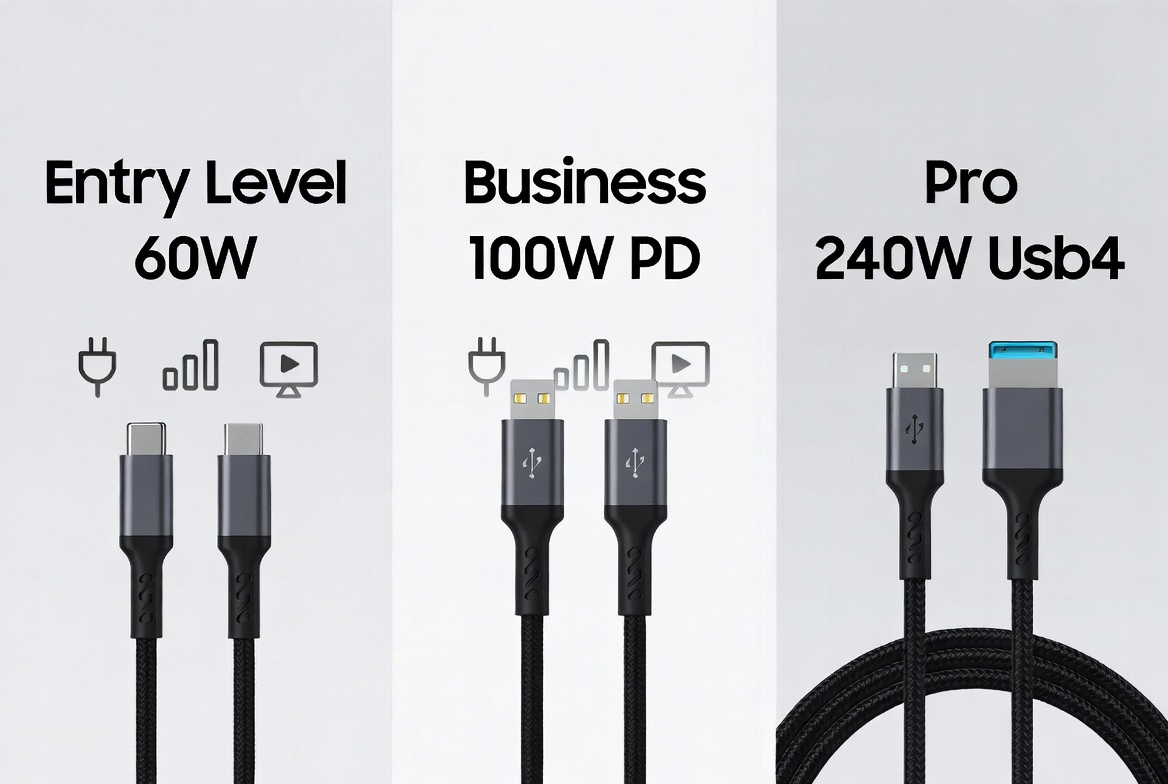
To balance cost, performance and safety, professional buyers can define clear product segments:
1. Entry‑level charging cables
Target: low‑power accessories and legacy phones.
Specs: non‑E‑Marker, 3A max, USB 2.0 data only. [iznctech]
2. Business‑class PD cables (65–100W)
Target: laptops, tablets, mixed‑brand office fleets.
Specs: E‑Marker, 100W PD, USB 3.x data, basic Alt Mode video support. [growandconvert]
3. Professional high‑bandwidth cables
Target: creators, engineers, industrial devices, Thunderbolt docks.
Specs: advanced E‑Marker, PD3.1 EPR up to 240W, USB4/Thunderbolt, 4K/8K video. [chargerlab]
Instead of competing solely on price, industrial and B2B buyers increasingly judge cables on compliance, reliability and lifecycle cost. Specifying E‑Marker chips that meet PD3.1, USB‑C 2.2, USB4 and Thunderbolt requirements, combined with consistent OEM processes, reduces warranty claims and strengthens brand reputation in professional markets. [blog.animonlive]
Use this quick checklist to match cable design with real‑world requirements: [en.hynetek]
1. Target devices – Laptop, phone, VR headset, dock, industrial instrument?
2. Required power – Does any device need more than 60W? If yes, specify an E‑Marker cable.
3. Required data rate – Are you moving large files or using Thunderbolt/USB4 peripherals?
4. Video needs – Will you rely on USB‑C for external monitors or projectors?
5. Environment – Office, gaming, industrial or automotive? Higher‑risk environments benefit from temperature‑sensing, high‑voltage‑tolerant E‑Marker chips. [chargerlab]
6. Certification – Require USB‑IF, USB4 or Thunderbolt certification to ensure interoperability and safety. [robertsiegers]
By answering these questions, buyers can quickly determine whether an E‑Marker cable is optional or non‑negotiable for their application. [iznctech]
For global brands and distributors, working with an experienced cable manufacturer ensures that E‑Marker integration is handled correctly across design, testing and certification. [blog.animonlive]
A specialist OEM/ODM partner can:
- Recommend the right E‑Marker chip families for PD3.1, USB4 and Thunderbolt ecosystems. [en.hynetek]
- Optimize cable construction (wire gauge, shielding, connector design) around real‑world charging and data profiles rather than theoretical maximums. [robertsiegers]
- Support private‑label and customized branding while maintaining underlying compliance and reliability standards. [blog.animonlive]
This approach allows brand owners to offer future‑proof USB‑C cables that match upcoming laptops, tablets, and industrial devices without costly redesigns every product cycle. [robertsiegers]
If you plan to launch or upgrade a cable portfolio for laptops, gaming devices, USB‑C docks or industrial equipment, now is the time to standardize on E‑Marker‑equipped designs for any product that needs more than 60W, fast data or video. [growandconvert]
Partnering with an experienced OEM/ODM cable manufacturer lets you turn complex PD3.1 and USB4 requirements into clear product families that your customers can trust, today and over the next generation of devices. [blog.animonlive]
Q1: Do I need an E‑Marker cable for a 65W business laptop?
Yes. Under USB‑C PD rules, 65W charging typically requires an E‑Marker cable to advertise 5A capability and enable full‑speed charging safely. [iznctech]
Q2: Can a non‑E‑Marker cable damage my devices?
While many non‑E‑Marker cables work at low power, forcing them to carry more than 3A or using them with uncertified high‑power chargers increases the risk of overheating and shutdown. [growandconvert]
Q3: Are all 240W cables automatically high quality?
Not necessarily. 240W support indicates an advanced E‑Marker and PD3.1 compliance, but overall quality still depends on materials, shielding and manufacturing processes. [robertsiegers]
Q4: What certifications should I look for in professional USB‑C cables?
Look for USB‑IF certification, PD3.1 compliance, and USB4 or Thunderbolt logos when applicable, as these signal standardized performance and safety. [robertsiegers]
Q5: How often do E‑Marker chips fail in real use?
Failures are relatively rare and usually tied to physical cable damage such as severe bending or fraying near connectors, which can break internal wiring and disrupt communication. [chargerlab]
1. Foyun Cables – "E‑Marker Chip: What It Does and When You Need It" https://fycables.com/e-marker-chip-what-it-does-and-when-you-need-it/
2. Chargerlab – "Injoinic Unveils Flagship E‑Marker Chip IP2133H" https://www.chargerlab.com/injoinic-unveils-flagship-e-marker-chip-ip2133h/
3. Hynetek – "Hynetek laid out e‑Marker, PD Source, PD DRP chips in advance …" https://en.hynetek.com/2571.html
4. IZNCTech – "Knowledge of E‑mark chip" https://www.iznctech.com/news/knowledge-of-e-mark-chip/
5. Animon Live – "How an electric cable and wire manufacturer benefited from SEO" https://blog.animonlive.com/how-an-electric-cable-and-wire-manufacturer-benefited-from-seo/
6. Robert Siegers – "SEO for Manufacturers: Strategies to Dominate Search in 2025" https://robertsiegers.com/en/seo-for-manufacturers


