:+86-13726207043
:info@yuxun.com
- All
- Product Name
- Product Keyword
- Product Model
- Product Summary
- Product Description
- Multi Field Search

Views: 281 Author: YUXUN CABLE Publish Time: 2026-07-08 Origin: Site


Content Menu
● Why Your HDMI Cable Matters More Than You Think
● HDMI Cable Types and Generations Explained
>> Common HDMI Cable Categories
● What "HDMI with Ethernet" Really Means
● Premium HDMI Certification: Your Confidence Marker
● Understanding Bandwidth: 10.2Gbps vs 18Gbps vs 48Gbps
● Spotting Fake or Misleading High‑Speed HDMI Cables
● Real‑World Use Cases: Home, Gaming, Office, and Pro AV
>> Office and Conference Rooms
>> Professional AV and Integrations
● Manufacturer Insight: Why OEM/ODM Quality Matters
● How to Choose the Right HDMI Cable with Ethernet
● OEM/ODM Perspective: Partnering with a Specialist Cable Manufacturer
● Quick Reference Table: HDMI Cable with Ethernet Essentials
● Call to Action: Build More Reliable HDMI Product Lines
● Frequently Asked Questions (FAQ)
A High-Speed HDMI cable with Ethernet is essential if you want stable 4K or next‑gen gaming performance and reliable device networking, especially in professional AV or B2B environments. As a manufacturer, choosing properly certified cables and a proven OEM/ODM partner lets you offer end customers premium visual quality, fewer support issues, and a future‑proof product line. [yuxun]
In this expert guide, I'll walk you through HDMI cable with Ethernet standards, certifications, bandwidth, and real‑world use cases, then add manufacturer‑level insights so you can make better purchasing and specification decisions. The perspective is from both an end‑user who cares about performance and a cable manufacturer working with global brands on OEM and ODM projects. [hdmi]
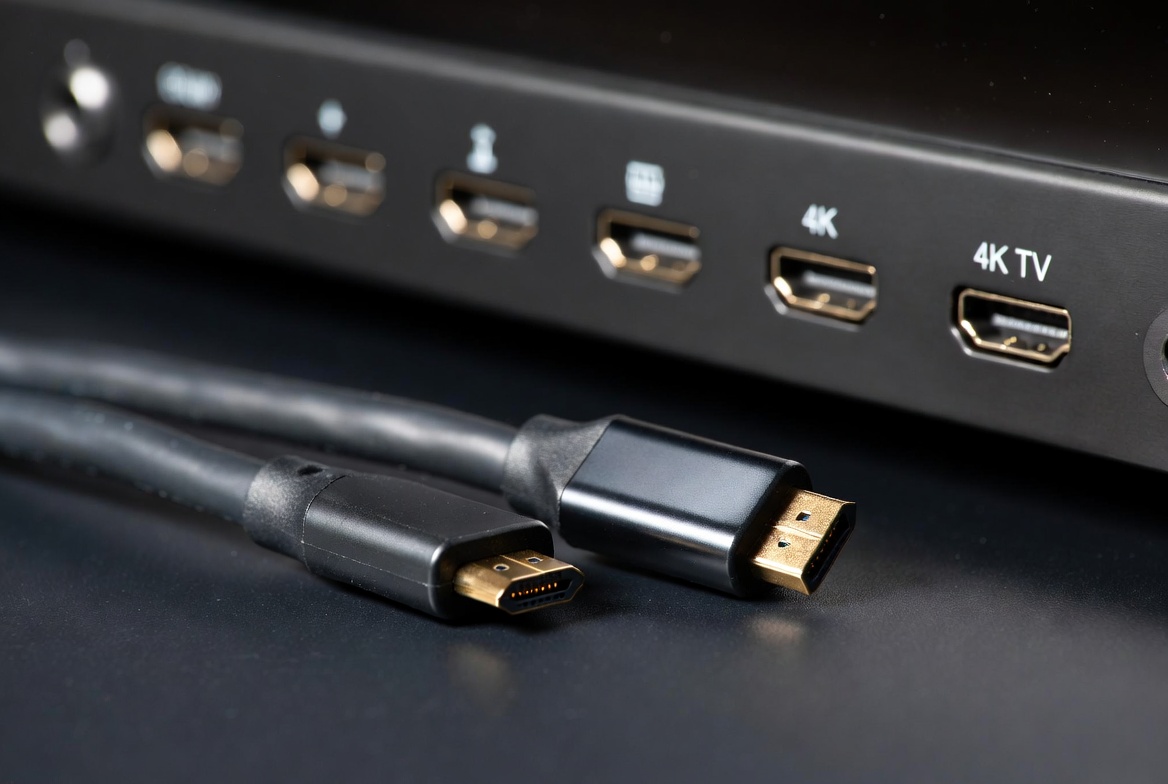
If you've ever connected a 4K TV, gaming console, or laptop and seen motion blur, random black screens, or audio dropouts, the cable is often the weakest link—not the device. Entry‑level or unverified HDMI cables can't consistently carry high‑bandwidth signals, so the image or audio stream degrades under stress such as HDR, 4K 60Hz, or long cable runs. [yuxun]
Key reasons the right HDMI cable matters:
- Signal integrity at high resolutions. Proper shielding and tested bandwidth prevent artifacts and intermittent signal loss. [homecontrols]
- Compatibility with modern standards. A High‑Speed HDMI cable with Ethernet supports key features like ARC/eARC, HDR, and 4K 60Hz when paired with compliant devices. [farnell]
- Reduced troubleshooting and returns. In B2B and project work, a certified cable dramatically cuts installation failures and customer complaints. [techhive]
From a manufacturer's perspective, every unstable cable is a future support ticket or warranty claim, which is why serious OEM/ODM suppliers invest in compliance testing instead of relying only on marketing labels. [hdmi]
Different HDMI cables target different performance levels, and bandwidth is the core metric you should look at. Confusion often arises because many products use generic "4K" labels without clarifying cable category or tested data rate. [en.wikipedia]
- Standard HDMI Cable
Typically supports up to 1080p or 4K at 30Hz, with a maximum bandwidth around 10.2Gbps. Suitable for legacy devices or basic office displays where frame rate and HDR are not critical. [hdmi]
- High‑Speed HDMI Cable / High‑Speed HDMI Cable with Ethernet
Designed and tested to handle 1080p and beyond, including 4K at 30Hz and advanced display technologies like 3D and Deep Color, with bandwidth up to about 10.2Gbps. When certified as Premium High‑Speed, these cables reliably support 4K 60Hz and up to 18Gbps. [hdmi]
- Ultra High‑Speed HDMI Cable
Introduced with HDMI 2.1, this category supports up to 48Gbps bandwidth for 8K@60 and 4K@120, as well as advanced gaming features like VRR and ALLM. For most current 4K 60Hz setups, Ultra High‑Speed is more about future‑proofing than immediate necessity. [en.wikipedia]
When specifying cables for a product or project, align the cable category with the maximum expected resolution, frame rate, and color depth rather than just today's use case. [hdmi]
A High‑Speed HDMI Cable with Ethernet includes an additional data channel called the HDMI Ethernet Channel (HEC). This allows network data (up to around 100Mbps) to travel over the same cable used for audio and video between compatible devices. [yuxun]
HDMI with Ethernet – practical advantages:
- Single‑cable networking. A smart TV and AV receiver can share an internet connection without separate Ethernet cables if both support HEC. [yuxun]
- Simplified cabling in racks and meeting rooms. Integrators can reduce cable clutter and potential failure points by combining network and AV over HDMI where feasible. [homecontrols]
- Better system design for connected devices. Streaming, firmware updates, and control signals can leverage the shared channel, provided all units in the chain are HEC‑enabled. [en.wikipedia]
If a device does not support HDMI Ethernet Channel, the cable still works perfectly for audio and video—it just won't carry Ethernet data. That's why most consumers don't notice the difference, but for integrators and OEMs designing connected AV ecosystems, HDMI with Ethernet is a strategic choice. [homecontrols]
Not every High‑Speed cable delivers real High‑Speed performance. That's where Premium HDMI Cable Certification comes in. Administered by HDMI Licensing, this program verifies that participating cables actually support 18Gbps bandwidth and meet strict EMI limits. [techhive]
What Premium HDMI Certified cables guarantee:
- Support for full 18Gbps bandwidth, covering 4K 60Hz, HDR, and expanded color spaces such as BT.2020. [hdmi]
- Additional EMI testing to ensure the cable does not interfere with Wi‑Fi and other wireless signals. [techhive]
- An anti‑counterfeit label with QR code so buyers can verify authenticity using standard apps. [techhive]
From the standpoint of an HDMI cable manufacturer, participating in the Premium program means more testing and higher cost, but it also creates a clear differentiation against low‑end competitors that claim "4K" performance without verifiable testing. For brand owners, distributing certified cables significantly reduces the risk associated with high‑bandwidth applications like home cinema, gaming, and professional displays. [hdmi]

Bandwidth is the total amount of data your HDMI cable can carry per second, and it directly dictates which resolutions and features are possible. [hdmi]
- Around 10.2Gbps: Supports up to 4K 30Hz or 1080p 60Hz, generally associated with High‑Speed HDMI without Premium certification. [yuxun]
- 18Gbps: The standard for reliable 4K 60Hz with HDR and full 4:4:4 color, tested in Premium High‑Speed HDMI cables. [farnell]
- Up to 48Gbps: Required for 8K content or 4K at 120Hz with advanced gaming features, associated with Ultra High‑Speed HDMI cables. [en.wikipedia]
In real installations, pushing a cable to its advertised limit without headroom can result in sporadic failures, especially over longer distances or in electrically noisy environments. This is why professional integrators and OEM buyers often treat 18Gbps as the practical minimum for modern 4K systems, even if end‑users say they "only watch streaming video." [homecontrols]
Counterfeit or low‑quality cables frequently use aggressive packaging claims but fail under stress testing, causing intermittent problems that are difficult for users to diagnose. [techhive]
Red flags to watch for:
- Vague labeling. Generic terms like "HDMI cable" or "4K ready" without bandwidth specifications or cable category. [yuxun]
- Missing certification marks. No Premium Certified label or QR code for 18Gbps claims. [hdmi]
- Suspiciously low pricing. Ultra‑cheap cables sold far below typical cost levels for certified or properly shielded products. [techhive]
A practical rule I use as an industry practitioner: if a cable claims 4K 60Hz support but does not specify 18Gbps bandwidth or carry a recognized certification label, treat that claim as marketing rather than engineering. Serious manufacturers prefer transparent datasheets and verifiable test reports because they understand that long‑term brand value depends on actual performance, not just packaging copy. [farnell]
From a user's perspective, the value of a High‑Speed HDMI cable with Ethernet becomes obvious in specific scenarios. [hdmi]
For a modern 4K TV with HDR content from streaming devices or Blu‑ray players, an 18Gbps Premium High‑Speed HDMI cable ensures full resolution, proper HDR metadata, and stable audio. If your AV receiver and TV support HDMI Ethernet Channel, a cable with Ethernet can also simplify network connectivity for streaming and firmware updates. [farnell]
Gamers running 4K 60Hz or higher frame rates on consoles or PCs need reliable bandwidth and low EMI to avoid signal dropouts during fast‑paced scenes. Here, a certified High‑Speed or Ultra High‑Speed cable is a small investment compared to the cost of hardware, yet it directly impacts perceived smoothness and responsiveness. [en.wikipedia]
In meeting rooms, HDMI with Ethernet can help unify display, audio, and network into fewer cables when devices support HEC. Stable HDMI connections reduce downtime during presentations and prevent embarrassing "no signal" moments in front of clients or executives. [homecontrols]
For integrators, the choice of cable influences installation distance, routing complexity, and maintenance risk. Certified cables with clearly documented specs are easier to design around, especially in environments where multiple sources, displays, and control systems share rack space. [hdmi]
From the manufacturing side, producing truly reliable HDMI cables requires controlled materials, rigorous process management, and systematic testing, not just attaching molded connectors to commodity wire. [farnell]
Professional HDMI cable manufacturers typically focus on:
- Conductor and insulation selection. Consistent copper quality, appropriate gauge (such as 34AWG in premium short‑length cables), and low‑loss dielectrics. [farnell]
- Shielding and EMI control. Multi‑layer shielding structures to minimize interference, especially important near wireless equipment. [homecontrols]
- Compliance with international standards. RoHS compliance, adherence to HDMI specifications such as HDMI 2.0 or 2.1, and alignment with industry best practices for labeling and traceability. [hdmi]
When brand owners work with an OEM/ODM partner, they are not just buying cables; they are outsourcing part of their user experience and product reputation. A strong manufacturing partner helps you avoid hidden quality issues that only appear months after deployment. [yuxun]
To make selection easier, here is an actionable checklist that both end‑users and B2B buyers can follow. [yuxun]
1. Confirm your resolution and frame rate.
- For 4K 60Hz with HDR, look for Premium High‑Speed HDMI Cable with Ethernet labeled at 18Gbps. [hdmi]
- For 8K or high‑frame‑rate gaming, choose an Ultra High‑Speed HDMI Cable rated up to 48Gbps. [en.wikipedia]
2. Check device compatibility for Ethernet over HDMI.
- Verify that both connected devices support HDMI Ethernet Channel (HEC); otherwise the Ethernet function will not be used. [yuxun]
3. Look for certification labels and QR codes.
- Genuine Premium HDMI cables carry a distinct label and scannable QR code; avoid products that rely solely on broad marketing claims. [techhive]
4. Align cable length with performance needs.
- Passive copper cables are typically most reliable up to about 5 meters at full 18Gbps, while active or fiber solutions extend reach for larger installations. [homecontrols]
5. Assess the manufacturer's documentation.
- Professional suppliers provide detailed datasheets with bandwidth, supported features, and compliance information, which is critical for project planning and procurement. [farnell]
By applying this checklist, you reduce the risk of under‑specifying the cable and ensure long‑term stability in both consumer setups and commercial deployments. [hdmi]
For international brand owners, wholesalers, and equipment manufacturers, the question is not just "Which cable should I buy?" but "Which partner should I trust to make my cables?" [yuxun]
A capable HDMI cable OEM/ODM partner typically offers:
- Custom specifications. Tailored length, gauge, jacket material, connector type, and packaging to match brand identity and technical requirements. [yuxun]
- Scalable production with quality control. Ability to handle batch orders while maintaining consistent performance across lots. [yuxun]
- Support for multi‑industry applications. Experience supplying cables for consumer electronics, industrial systems, and professional AV ensures cross‑sector reliability. [yuxun]
Working with a manufacturer deeply familiar with HDMI standards and Ethernet integration allows you to develop branded cables that align with your product roadmap, from current 4K solutions to future 8K or high‑refresh‑rate ecosystems. [yuxun]

| Item | What to Check | Why It Matters |
|---|---|---|
| Cable Category | High‑Speed, Premium High‑Speed, Ultra High‑Speed | Ensures alignment with required resolution/frame rate. (hdmi) |
| Bandwidth Rating | 18Gbps for 4K 60Hz; 48Gbps for 8K/4K 120Hz | Determines maximum supported visual and audio features. (yuxun) |
| Ethernet Support | "With Ethernet" and HEC‑enabled devices | Enables shared network connectivity over HDMI. (yuxun) |
| Certification Label | Premium HDMI or Ultra High‑Speed label + QR code | Verifies testing against official performance and EMI standards. (techhive) |
| Manufacturer Documentation | Datasheets, compliance declarations | Provides confidence for OEM procurement and project design. (farnell) |
Whether you're an AV integrator, a hardware brand, or a sourcing manager, treating HDMI cables with Ethernet as a strategic component rather than a generic accessory will improve your customer experience and long‑term product reputation. When planning your next 4K or 8K deployment, review your cable specification strategy and consider partnering with a specialist manufacturer that can support certified, high‑bandwidth HDMI with Ethernet solutions tailored to your market. [yuxun]
If you're currently evaluating HDMI cable suppliers, now is the right time to audit your existing cable portfolio, verify bandwidth and certification, and upgrade to robust OEM/ODM solutions that match the performance promise of your devices. [techhive]
1. Do I really need a Premium High‑Speed HDMI cable for 4K 60Hz?
Yes. For consistent 4K 60Hz with HDR and full color, a cable tested to 18Gbps under the Premium program is strongly recommended. [hdmi]
2. Will HDMI with Ethernet work if only one device supports HEC?
No. HDMI Ethernet Channel functionality requires both connected devices to be HEC‑enabled; otherwise the cable acts as a standard HDMI cable for audio and video only. [hdmi]
3. Is an Ultra High‑Speed HDMI cable necessary for a regular 4K TV?
It's not strictly necessary for standard 4K 60Hz content, but Ultra High‑Speed cables provide headroom for future features like 4K 120Hz or 8K content. [en.wikipedia]
4. How can I verify that an HDMI cable is genuine and certified?
Check for official certification labels (Premium or Ultra High‑Speed) and use the QR code to confirm authenticity via the relevant verification app. [hdmi]
5. Why do some cheap HDMI cables work fine at first and then fail?
Lower‑quality materials and inadequate shielding can function under light use but break down under sustained high‑bandwidth loads or in electrically noisy environments, leading to intermittent issues over time. [homecontrols]
1. HDMI Licensing Administrator – "HDMI Cables: Different Cable Types and Capabilities." https://www.hdmi.org/resource/cables
2. HDMI Licensing Administrator – "Premium High Speed HDMI® Cable Certification Program." https://www.hdmi.org/spec/premiumcable
3. TechHive – "HDMI Licensing Group Launches Cable Certification Program." https://www.techhive.com/article/599973/a-new-hdmi-certification-program-will-make-it-easier-to-avoid-crappy-cables.html
4. Wikipedia – "HDMI." https://en.wikipedia.org/wiki/HDMI
5. Farnell – "Premium Certified HDMI 2.0 Cable with Ethernet Datasheet." https://www.farnell.com/datasheets/4386906.pdf
6. On‑Q Legrand – "Premium HDMI Cables Specifications." https://www.homecontrols.com/homecontrols/products/pdfs/OQ-OnQLegrand/On-Q-Legrand-Premium-HDMI-Cables-Specifications.pdf
7. Yuxun – "High‑Speed Transmission Cables and HDMI Cable Manufacturer." https://www.yuxun.com/
8. Yuxun – "Products Overview." https://www.yuxun.com/products.html
9. FYCables – "HDMI Cable with Ethernet Guide: Certifications & Bandwidth Explained." https://fycables.com/hdmi-cable-with-ethernet-guide-certifications-bandwidth-explained/


