:+86-13726207043
:info@yuxun.com
- All
- Product Name
- Product Keyword
- Product Model
- Product Summary
- Product Description
- Multi Field Search

Views: 242 Author: YUXUN CABLE Publish Time: 2026-06-28 Origin: Site


Content Menu
● Understanding USB4 vs USB3.2 Gen2x2
● Speed, Bandwidth and Real‑World Performance
>> Performance comparison table
● Protocol Flexibility and Use‑Case Versatility
● Power Delivery and Charging Capabilities
● Cable Design, Testing and Certification: An OEM Perspective
● How OEMs and Brands Should Choose
● Expert Insight: Designing Future‑Proof High‑Speed Cables
● Practical Selection Steps for Product Managers
● How a Specialized High‑Speed Cable OEM Adds Value
● Conclusion and Call to Action
● FAQs
USB4 is now the strategic choice for future‑proof high‑speed transmission, while USB3.2 Gen2x2 remains a solid but limited transitional standard for legacy devices and cost‑sensitive use cases. [fycables]
USB4 and USB3.2 Gen2x2 were both designed to push data rates beyond traditional USB 3.0, but they reflect two very different connectivity philosophies. USB3.2 Gen2x2 essentially doubles existing USB 3.2 lanes to reach 20 Gbps, whereas USB4 is built on a Thunderbolt‑derived architecture that supports up to 40 Gbps today and 80 Gbps in its v2.0 evolution. For OEMs, brands, and system integrators, this difference translates directly into how you design your next‑generation cables, hubs, PCs, and industrial devices. [eshop.comoss]
USB4 speed and bandwidth
USB4 offers 40 Gbps bidirectional bandwidth, doubling the 20 Gbps limit of USB3.2 Gen2x2. At this level, typical 4K/120 Hz video streams can be carried without compression, and large data sets—such as 100 GB files—can be moved in roughly half the time compared with USB3.2 Gen2x2 in ideal conditions. As USB4 v2.0 scales to 80 Gbps and supports up to 120 Gbps asymmetric modes for certain display scenarios, it becomes viable even for 8K, high‑frame‑rate content and mixed workloads. [eet-china]
USB3.2 Gen2x2 performance profile
USB3.2 Gen2x2 reaches 20 Gbps by using two 10 Gbps lanes, which is still a major step up from older USB 3.0 interfaces for file transfers, industrial vision data streams, and external SSDs. In practice, this is sufficient for 4K/60 Hz video with compression, high‑speed backups, and most office or light industrial workloads, but it begins to struggle when multiple high‑bandwidth tasks—such as simultaneous display plus heavy I/O—are required. [eshop.comoss]
| Feature | USB4 (40 Gbps) | USB3.2 Gen2x2 (20 Gbps) |
|---|---|---|
| Max data rate | 40 Gbps (fycables) | 20 Gbps (fycables) |
| 4K video support | 4K/120 Hz uncompressed (fycables) | 4K/60 Hz with compression (fycables) |
| Typical file transfer | ~25 s for 100 GB (ideal) (fycables) | 50+ s for 100 GB (ideal) (fycables) |
| Future scaling | Up to 80 Gbps, 120 Gbps asymmetric (eet-china) | No defined roadmap beyond 20 Gbps (eshop.comoss) |

USB4 as a multi‑protocol backbone
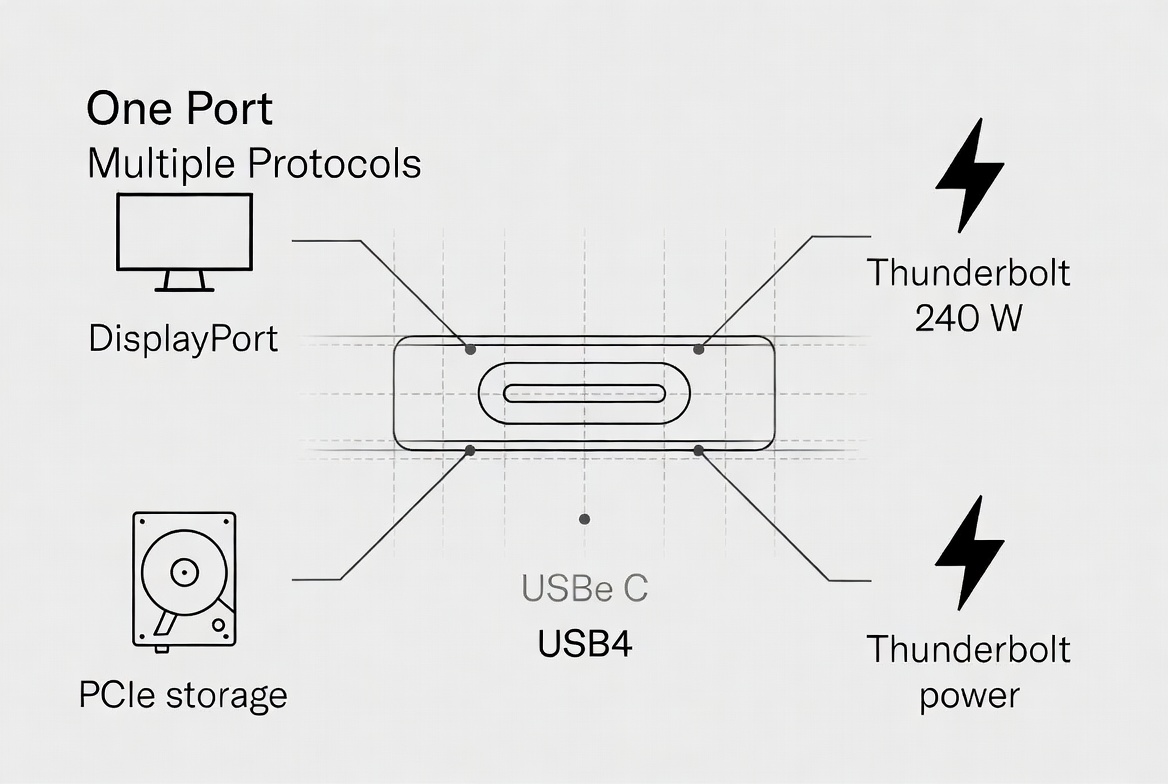
USB4 integrates Thunderbolt 3/4, enhanced USB data channels, DisplayPort and PCIe tunneling, turning a single Type‑C port into a flexible backbone for compute, storage and display. This allows OEMs to support external GPUs, NVMe enclosures, multi‑monitor docking, and high‑power charging over the same cable, with dynamic bandwidth allocation based on real‑time workload. Backward compatibility with USB 2.0 and USB 3.x devices further simplifies system design and reduces user confusion when migrating to new platforms. [graniteriverlabs.com]
USB3.2 Gen2x2 as a focused high‑speed data channel
By contrast, USB3.2 Gen2x2 remains USB‑only, optimized primarily for bulk data transfer rather than heterogeneous tunneling of multiple protocols. This makes it attractive in focused applications like machine vision, industrial cameras, and dedicated storage links where predictable, high‑speed data paths are more important than protocol diversity. For brands targeting niche industrial segments, this focused feature set can balance cost with performance while still meeting demanding throughput requirements. [fycables]
USB4 and Power Delivery 3.1
Modern USB4 implementations support USB Power Delivery 3.1, offering up to 240 W over certified Type‑C cables. This allows a single USB4 cable to power high‑performance laptops, docking stations, monitors, or even compact industrial controllers while simultaneously handling high‑speed data and video. For system designers, this reduces the number of connectors and simplifies mechanical design, especially in slim notebooks, all‑in‑one PCs, and compact industrial enclosures. [eet-china]
USB3.2 Gen2x2 power envelope
USB3.2 Gen2x2 typically works with earlier PD profiles, often capped around 100 W, which is sufficient for many thin‑and‑light laptops, tablets, and peripherals. However, in power‑hungry scenarios—workstations, multi‑drive enclosures, or large displays—brands increasingly prefer USB4 for its higher PD ceiling and improved thermal behavior at equivalent performance levels. [eshop.comoss]
From a manufacturing standpoint, the shift from USB3.2 Gen2x2 to USB4 is not just a protocol upgrade; it is a cable‑engineering challenge. [comoss]
Signal integrity and construction
Meeting USB4's 40 Gbps or 80 Gbps requirements demands advanced cable builds using coaxial structures, tighter impedance control and improved shielding to preserve signal integrity over typical one‑meter lengths. Passive USB4 Type‑C cables must pass strict compliance tests for attenuation, crosstalk and skew, while active 80 Gbps cables incorporate re‑timers and new physical‑layer encoding schemes such as PAM3. By contrast, USB3.2 Gen2x2 cables, while still demanding, can use less complex constructions and are generally easier to produce at volume without sacrificing reliability. [comoss]
Certification and brand trust
USB‑IF compliance and third‑party lab testing remain critical for both standards, but especially for USB4 where subtle design flaws can cause significant speed drops or mode‑fallback issues. For global brands, working with an OEM/ODM partner that understands these certification workflows, fixture requirements and failure modes is essential to avoid post‑launch compatibility problems. [graniteriverlabs.com]

For cable buyers, PC OEMs and industrial integrators, the decision is rarely "technical only"; it is a portfolio strategy.
When USB4 is the best fit
USB4 is the preferred choice when:
- You design premium laptops, docks or monitors that require unified data, video and high‑power charging. [fycables]
- Your users rely on external SSDs, NVMe or GPUs, and expect performance close to internal interfaces. [eet-china]
- You want to future‑proof for 8K displays, multiple screens and evolving PD requirements over the next hardware cycle. [eet-china]
When USB3.2 Gen2x2 still makes sense
USB3.2 Gen2x2 can be the right answer when:
- You target cost‑sensitive markets where 20 Gbps is already a leap from legacy USB 3.0. [eshop.comoss]
- Your workloads are single‑purpose high‑bandwidth data streams, such as machine vision or industrial cameras. [eshop.comoss]
- You need backward‑compatible high speed without committing to the full Thunderbolt/USB4 ecosystem. [fycables]
Drawing on current industry standards and OEM case studies, several expert design principles emerge. [graniteriverlabs.com]
1. Design for the highest credible use case. If your roadmap includes 4K/120 Hz or multi‑monitor docks, start from USB4 requirements—even if your first generation ships at 20 Gbps modes. [fycables]
2. Treat cable length as a performance parameter, not an afterthought. At higher Gbps levels, small length increases can drastically affect stability; invest early in length‑specific designs and testing. [comoss]
3. Align mechanical and electrical design. Connector housing, strain relief, and shielding layouts must be coordinated with the chosen conductor structure to avoid hidden failure points in real‑world usage. [comoss]
4. Plan for certification as part of development. Building test‑ready samples and engaging accredited labs early reduces late surprises and supports stronger marketing claims after launch. [graniteriverlabs.com]
For brands engaged in global sourcing, partnering with specialized high‑speed cable manufacturers that already manage these complexities can reduce cycle times and improve first‑pass yield. [yuxun]
To translate these concepts into everyday decisions, product managers can follow a simple selection framework.
1. Define core scenarios.
- Mobile productivity (laptops + docks + displays)
- High‑speed storage and data backup
- Industrial vision and automation
2. Map required bandwidth and power.
- If you need above 20 Gbps or >100 W PD, favor USB4 as the baseline. [eet-china]
- If your maximum requirement is 20 Gbps and 100 W, evaluate USB3.2 Gen2x2 for cost advantages. [eshop.comoss]
3. Assess ecosystem and compatibility.
- Mixed Thunderbolt/USB use and multi‑protocol demands point to USB4. [fycables]
- Single‑purpose data lines with controlled device sets can remain on USB3.2 Gen2x2. [eshop.comoss]
4. Plan upgrade paths.
- Consider starting a portfolio with Gen2x2 for entry lines and USB4 for flagship products, then shifting more SKUs to USB4 as costs and user expectations evolve. [eet-china]
A high‑speed cable manufacturer focused on OEM and ODM work can support brands and wholesalers in several strategic ways. [yuxun]
- Custom engineering for specific bandwidth and power profiles, ensuring cable designs align with device‑level integration plans. [comoss]
- Early‑stage prototype support so that OEMs can validate USB4 and USB3.2 Gen2x2 performance in real systems before mass deployment. [graniteriverlabs.com]
- Certification‑ready documentation and testing, simplifying USB‑IF, Thunderbolt and third‑party lab engagement. [graniteriverlabs.com]
- Long‑term supply and quality management, which is crucial for industrial and enterprise customers that depend on consistency across multiple rollouts. [graniteriverlabs.com]
For brands that need both advanced USB4 cables and more cost‑effective USB3.2 Gen2x2 lines, such an OEM can build a layered portfolio that matches different tiers of product and price without fragmenting standards. [fycables]
USB4 and USB3.2 Gen2x2 are not competing in isolation; they are complementary tools in a well‑planned connectivity strategy where USB4 leads the future and USB3.2 Gen2x2 stabilizes the present. By understanding their speed limits, protocol capabilities, power envelopes and cable‑engineering requirements, OEMs, brands and wholesalers can make better sourcing decisions and design products that remain relevant across more than one generation. [eet-china]
If you are planning your next high‑speed product line—whether for consumer devices, industrial systems or OEM‑branded accessories—consider defining clear performance tiers and collaborating early with a dedicated high‑speed cable manufacturer to turn those specifications into reliable, certified cables at scale. [yuxun]
Q1: Is USB4 always faster than USB3.2 Gen2x2?
In typical implementations, USB4 offers up to 40 Gbps and USB4 v2.0 up to 80 Gbps, while USB3.2 Gen2x2 is limited to 20 Gbps, so USB4 has a clear performance advantage when properly implemented and certified. [fycables]
Q2: Do I need special cables to get full USB4 speed?
Yes, USB4 performance depends on certified Type‑C cables that meet stringent signal‑integrity and construction requirements; non‑compliant cables may fall back to lower speeds or modes. [graniteriverlabs.com]
Q3: Can USB4 replace Thunderbolt in my product line?
USB4 integrates Thunderbolt‑derived technology and can support many Thunderbolt use cases such as high‑speed storage and docking, but actual capabilities depend on host and device implementations. [eet-china]
Q4: Is USB3.2 Gen2x2 still relevant for new designs?
USB3.2 Gen2x2 remains relevant for cost‑optimized products and focused high‑bandwidth data lines where 20 Gbps is sufficient and full multi‑protocol support is not required. [eshop.comoss]
Q5: How should I plan for USB4 v2.0 and 80 Gbps?
You should evaluate future display and data requirements, work with cable and device partners experienced in high‑speed PAM3‑based designs, and consider gradual migration paths as ecosystems and certification frameworks mature. [graniteriverlabs.com]
1. USB4 vs. USB3.2 Gen2x2: Speed, Bandwidth & Future Tech – FYCables https://fycables.com/usb4-vs-usb3-2-gen2x2-speed-bandwidth-future-tech/
2. USB4 v2.0规范命名为USB 80Gbps – https://www.eet-china.com/news/202210241633.html
3. USB 3.2 Gen 2 cables and machine vision applications – COMOSS https://eshop.comoss.com/blogs/product-konwledge/usb-3-2-gen-2-cables-a-new-trend-for-high-speed-transmission-in-machine-vision
4. USB4 passive cable testing and certification – Granite River Labs https://www.graniteriverlabs.com/zh-tw/technical-blog/usb4-passive-cable-compliance
5. USB4 GEN3 240W 1m coaxial cable certification case – COMOSS https://www.comoss.com/post/昕钰完成USB4-GEN3-240W-1米认证-同轴线测试分享


