:+86-13726207043
:info@yuxun.com
- All
- Product Name
- Product Keyword
- Product Model
- Product Summary
- Product Description
- Multi Field Search

Views: 222 Author: YUXUN CABLE Publish Time: 2026-06-12 Origin: Site


Content Menu
● What You Should Check Before Choosing a Connection
● Method 1: Optical Cable (TOSLINK) – The Best Non‑HDMI Digital Option
>> Expert Notes
● Method 2: Bluetooth – Fast, Wireless, but With Latency
>> Expert Notes
● Method 3: RCA (Analog) – Reliable for Older TVs
>> Expert Notes
● Method 4: 3.5 mm AUX – Simple and Universally Recognized
>> Expert Notes
● Method 5: Wi‑Fi Streaming – Flexible for Smart Homes
>> Expert Notes
● At‑a‑Glance Comparison of Non‑HDMI Methods
● Pro Checklist: Get It Right the First Time
● Troubleshooting: No Sound, Delay, or Poor Quality
● When You Should Still Choose HDMI (And Better Cables)
● Why Work With an OEM/ODM HDMI Cable Manufacturer
● FAQs: Connecting a Soundbar Without HDMI
Connecting home theater systems is something I see many users struggle with in real projects, especially when the TV is short on HDMI ports or lacks HDMI ARC/eARC. From a product engineer and installer perspective, the goal is simple: get stable, clean audio with the least friction for the end user. In this guide, I will walk you through five proven non‑HDMI methods, plus expert tips on audio formats, troubleshooting, and when an HDMI or high‑performance cable still makes the most sense. [ecosmarthomepros]
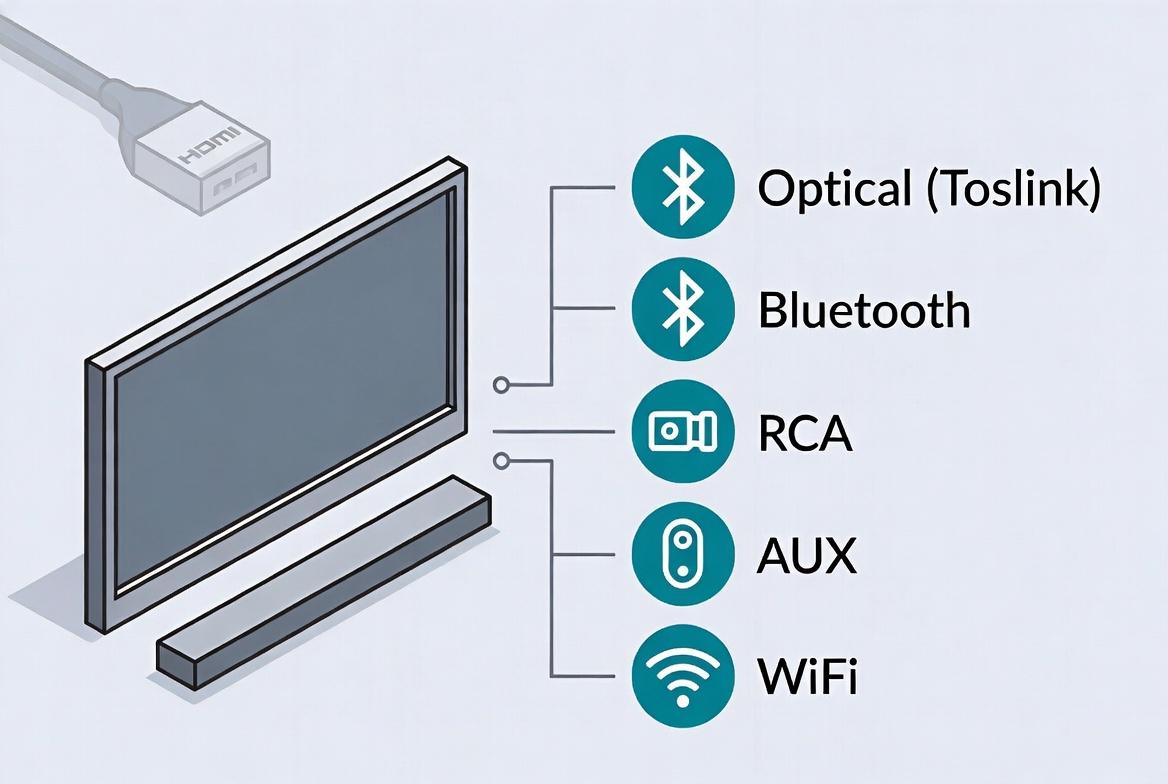
Before you plug in any cable, take 1–2 minutes to audit your current setup. This avoids trial‑and‑error and protects ports from damage. [alibaba]
- Available TV audio outputs: Look for Optical (TOSLINK), Digital Coaxial, RCA (red/white), 3.5mm headphone jack, or Bluetooth/Wi‑Fi support. [audiochamps]
- Soundbar inputs: Check for Optical In, Coaxial In, AUX/Line In, RCA, Bluetooth, or Wi‑Fi/app support. [blog.saleslayer]
- Usage scenario: Casual streaming, gaming, or a dedicated movie room have different latency and quality requirements. [ecosmarthomepros]
- Future expansion: If you plan to add game consoles or 4K/8K players later, plan a path that can be upgraded with a high‑bandwidth HDMI cable.
A quick photo of the back of your TV and soundbar can be invaluable when planning or sharing with your installer or supplier.
For most non‑HDMI setups, optical (TOSLINK) is the first method I recommend because it carries digital audio with strong noise immunity over reasonable distances. [alibaba]
- Optical (TOSLINK) audio cable
- TV with "Optical Out" / "Digital Audio Out" port
- Soundbar with "Optical In" / "Digital In" port [blog.saleslayer]
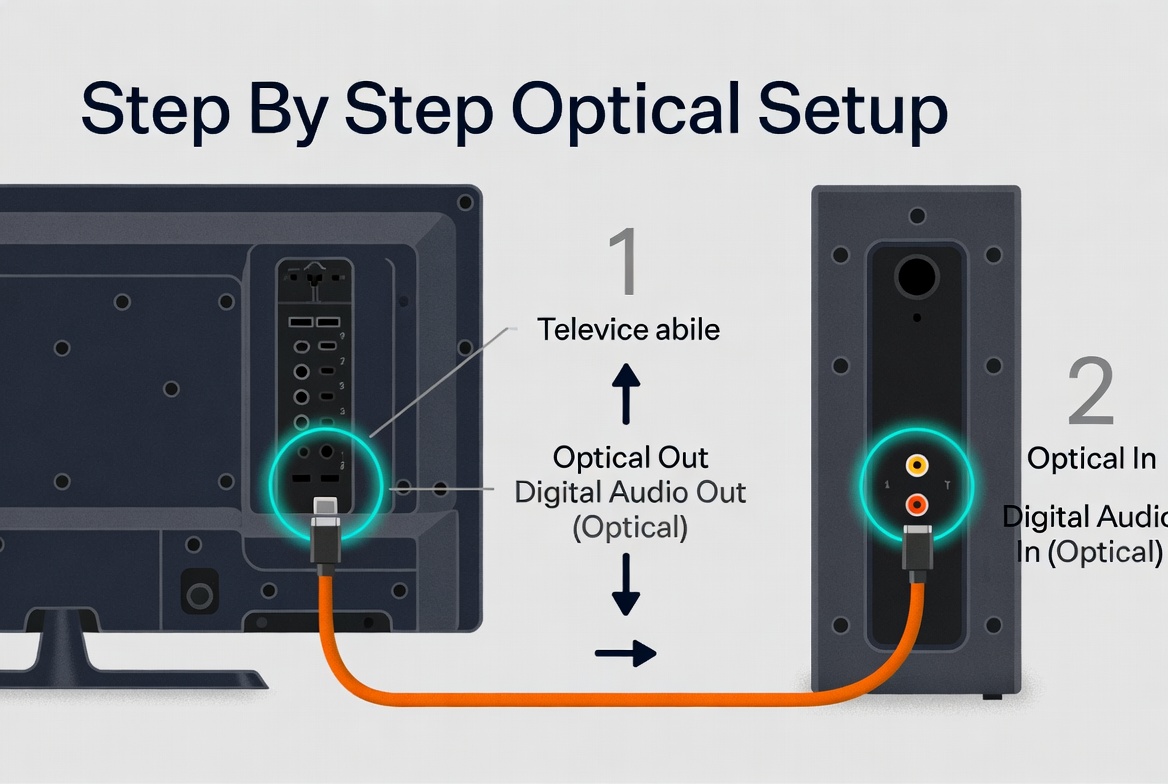
1. Power off TV and soundbar to avoid hot‑plugging surges. [alibaba]
2. Locate ports labeled "Optical", "Digital Audio Out" on the TV and "Optical In/Digital In" on the soundbar. [sony-asia]
3. Remove protective caps from the optical cable ends and align the square connector gently—never force it. [alibaba]
4. Connect TV to soundbar using the optical cable, ensuring a firm click.
5. Power on devices, then set the soundbar input to "OPT", "DIGITAL", or similar. [audiochamps]
6. Configure TV audio settings to "Optical", "Digital Out", or "External Speaker", and disable internal TV speakers if available. [audiochamps]
- Optical supports high‑quality digital audio, including multichannel formats, but typically does not carry advanced formats like full Dolby Atmos in the same way HDMI eARC does. [ecosmarthomepros]
- For TVs mounted on walls, consider slim or right‑angle optical connectors to reduce strain on the port.
If your TV and soundbar both support Bluetooth, this is often the quickest way to get sound without extra cables. However, as an audio specialist, I only recommend Bluetooth for casual viewing, not for latency‑sensitive gaming or high‑fidelity movie nights. [blog.saleslayer]
- Bluetooth‑enabled TV
- Bluetooth‑enabled soundbar [audiochamps]
1. Enable Bluetooth pairing on the soundbar (check the manual for the pairing button or menu). [youtube]
2. On the TV, open the Bluetooth or Audio settings, then search for devices. [sony-asia]
3. Select your soundbar from the list and confirm pairing.
4. Play a video and listen for audio sync and dropouts.
- Expect slight audio delay with some TV/soundbar combinations; look for a "lip sync" or "audio delay" setting if voices appear out of sync. [youtube]
- Interference from Wi‑Fi routers or crowded 2.4 GHz environments can impact stability; if this is an issue, a cable‑based solution is more robust.
Many legacy TVs still offer RCA red/white analog audio outputs, and a lot of entry‑level soundbars retain analog inputs for compatibility. [blog.saleslayer]
- RCA audio cable (red and white connectors)
- TV with "Audio Out" (red/white)
- Soundbar with RCA "Audio In" or "Line In" [alibaba]
1. Identify TV RCA outputs labeled "Audio Out" or similar, not component video outputs. [blog.saleslayer]
2. Connect red to red, white to white from TV "Out" to soundbar "In".
3. On the soundbar, select AUX/Line/RCA input mode.
4. In the TV audio menu, select "Analog", "RCA", or "External Speaker" as the output. [audiochamps]
- RCA is stereo only, so do not expect surround effects, but it still offers a clear upgrade over most built‑in TV speakers. [alibaba]
- Use shorter, shielded cables to minimize interference, especially in environments with many power cables or industrial equipment.
If your TV has a headphone jack and your soundbar includes a 3.5 mm or AUX input, this is another straightforward analog option. [audiochamps]
- 3.5 mm male‑to‑male AUX cable
- TV with headphone output
- Soundbar with AUX/3.5 mm input [blog.saleslayer]
1. Plug one end of the AUX cable into the TV's headphone output.
2. Connect the other end to the soundbar's AUX or "Line in" port. [audiochamps]
3. Set TV audio output to "Headphones" or "External Speakers".
4. Adjust the TV volume to around 70–80%, then fine‑tune volume on the soundbar for best dynamic range. [audiochamps]
- Some TVs mute internal speakers automatically when a headphone jack is used; this is normal. [blog.saleslayer]
- If max volume feels low, check whether the TV has a headphone volume limit or safety mode in the settings.
High‑end soundbars from brands like Sonos and Bose support Wi‑Fi streaming, enabling multi‑room audio and app‑based control. This is excellent in smart homes, but it relies on a solid network and sometimes an intermediary device (phone, streaming stick, or smart TV app). [act-connectivity]
- Wi‑Fi‑enabled soundbar
- Home Wi‑Fi network
- TV or streaming device that supports casting (Chromecast, AirPlay, proprietary app) [blog.saleslayer]
1. Install the soundbar's app (e.g., Bose Music, Sonos) on your phone or tablet. [audiochamps]
2. Use the app to connect the soundbar to your Wi‑Fi network.
3. Ensure your TV or streaming device is on the same network.
4. Use casting features (Chromecast, AirPlay, or in‑app casting) to route audio to the soundbar. [blog.saleslayer]
- Wi‑Fi can deliver high‑quality audio and synchronized multi‑room playback, but setup is more advanced than simply plugging in a cable. [act-connectivity]
- For mission‑critical environments (conference rooms, digital signage), I still recommend a primary wired path with HDMI or professional‑grade digital cabling and Wi‑Fi as a secondary option. [youtube]
| Connection method | Audio quality | Latency for movies/games | Setup difficulty | Best use case |
|---|---|---|---|---|
| Optical (TOSLINK) | Digital, clean, supports multichannel but not full Atmos like eARC (blog.saleslayer) | Very low | Moderate | Main TV, home theater without HDMI ARC |
| Bluetooth | Compressed, quality varies by codec (ecosmarthomepros) | Medium to high | Easy | Wireless convenience, casual streaming |
| RCA analog | Stereo only, depends on cable quality (blog.saleslayer) | Low | Simple | Older TVs, budget setups |
| 3.5 mm AUX | Stereo, similar to RCA (blog.saleslayer) | Low | Very easy | Quick upgrade from TV speakers |
| Wi‑Fi streaming | High potential quality, network‑dependent (act-connectivity) | Variable | Advanced | Smart homes, multi‑room audio |
In real‑world installations, problems usually come from missed settings rather than bad hardware. Use this quick checklist each time you connect a soundbar without HDMI: [alibaba]
1. Identify TV outputs: optical, coaxial, RCA, 3.5 mm, Bluetooth, or Wi‑Fi. [alibaba]
2. Match to soundbar inputs and choose the highest‑quality compatible method. [alibaba]
3. Power off devices before plugging cables to protect ports. [alibaba]
4. Make a firm, straight connection and avoid sharply bending optical or HDMI cables. [youtube]
5. Select the correct input on the soundbar (OPT, COAX, AUX, BT, Wi‑Fi). [audiochamps]
6. Update TV audio settings to route sound externally and disable TV speakers where appropriate. [blog.saleslayer]
7. Test multiple content sources (apps, antenna, HDMI devices) to confirm everything works. [alibaba]
Even with the right method, you may encounter issues. Here is how I systematically debug setups for clients.
- No sound at all
- Confirm the soundbar input matches your connection (OPT, AUX, BT, etc.). [audiochamps]
- Check TV audio output is set to the correct mode, not "TV speakers" only. [blog.saleslayer]
- Inspect cables for loose connections or damage.
- Audio delay or lip‑sync issues
- Over Bluetooth, enable "AV Sync" or adjust "Audio Delay" on the TV or soundbar. [youtube]
- For optical/HDMI, some TVs have a "Pass‑Through" or "Bitstream" setting that improves sync. [sony-asia]
- Distorted or weak sound
- Avoid running both TV and soundbar at maximum volume; keep TV at mid‑high and control final level on the soundbar. [audiochamps]
- For analog connections, make sure you're using the correct audio output ports, not inputs.
If repeated troubleshooting fails, the problem is often a limited or damaged port on older TVs, which is where a more modern connection and quality cable become decisive.
While this article focuses on non‑HDMI methods, as a cable manufacturer I would be remiss not to say: HDMI with ARC/eARC remains the gold standard for modern TV–soundbar setups. [ecosmarthomepros]
You should seriously consider upgrading to an HDMI‑based connection if:
- You want Dolby Atmos or high‑bandwidth surround formats and your TV/soundbar both support eARC. [sony-asia]
- You are adding multiple 4K/8K sources (consoles, streaming boxes, Blu‑ray) and need reliable high‑speed transmission. [act-connectivity]
- Your existing non‑HDMI ports are failing or limited, causing random dropouts or noise.
In these cases, a high‑quality HDMI cable or active optical HDMI cable from a specialist OEM/ODM manufacturer ensures stable bandwidth, better shielding, and reliable performance over longer distances. [konstructdigital]
For brands, distributors, and hardware producers, connectivity guides like this are also a touchpoint to build trust in your products and supply chain. An experienced manufacturer can help you:
- Customize HDMI and AV cable designs for specific TV, soundbar, or AV ecosystems, including active optical designs for long‑distance runs. [youtube]
- Ensure consistent quality control across bulk orders, avoiding customer returns due to intermittent signals.
- Co‑develop education content and packaging guides that reduce support tickets and installation errors. [konstructdigital]
When your end users read guides like this on your website, they should feel that the same level of engineering rigor goes into every cable they buy from you.
1. Which non‑HDMI method gives the best audio quality?
Optical (TOSLINK) generally offers the best balance of digital audio quality and low latency when HDMI is not available, especially compared to analog RCA or Bluetooth. [ecosmarthomepros]
2. Is Bluetooth good enough for movies and gaming?
Bluetooth is convenient but often introduces slightly higher latency; for casual streaming it is fine, but for competitive gaming or lip‑sync‑critical viewing, optical or HDMI is usually better. [youtube]
3. Can I use adapters to convert HDMI to optical or AUX?
Yes, HDMI audio extractors can convert HDMI to optical or analog outputs, but you should choose reputable devices and pair them with certified, high‑quality cables to avoid handshake issues. [act-connectivity]
4. Why does my soundbar keep losing connection over Bluetooth?
Wi‑Fi congestion, physical obstacles, or distance can cause Bluetooth dropouts; try reducing interference, updating firmware, or switching to a wired connection like optical or AUX. [youtube]
5. Do I need a "premium" optical cable?
For normal home distances, most properly manufactured optical cables perform similarly, but robust connectors, better strain relief, and careful QC from a trusted manufacturer significantly improve long‑term reliability. [konstructdigital]
1. FYCables – "Connecting a Soundbar to TV Without HDMI: 5 Simple Methods (Step‑by‑Step Guide)" – [https://fycables.com/connecting-a-soundbar-to-tv-without-hdmi-5-simple-methods/] [blog.saleslayer]
2. Sony Support – "How do I connect a Sound Bar to my television?" – [https://www.sony-asia.com/electronics/support/articles/00014997] [sony-asia]
3. Alibaba Product Insights – "How To Connect A Soundbar To Your TV Without HDMI ARC" – [https://www.alibaba.com/product-insights/how-to-connect-a-soundbar-to-your-tv-without-hdmi-arc.html] [alibaba]
4. Audio Champs – "Streaming Sounds: Connecting Your Soundbar to Your Smart TV Without HDMI" – [https://audiochamps.com/how-do-i-connect-my-soundbar-to-my-smart-tv-without-hdmi/] [audiochamps]
5. Eco Smart Home Pros – "The Right Way to Connect a Soundbar (And Why It Matters)" – [https://ecosmarthomepros.com/the-right-way-to-connect-a-soundbar-and-why-it-matters/] [ecosmarthomepros]
6. ACT Connectivity – "HDMI Solutions: Find the Right Splitter, Switch, or Extender for Your Setup" – [https://www.act-connectivity.com/en-us/expertise-center/hdmi-solutions-find-the-right-splitter-switch-or-extender-for-your-setup] [act-connectivity]
7. Sales Layer – "SEO for Manufacturing Companies: The 2026 Strategy Guide" – [https://blog.saleslayer.com/seo-for-manufacturing-companies] [blog.saleslayer]
8. Konstruct Digital – "Industrial SEO: How to Navigate Long Sales Cycles" – [https://www.konstructdigital.com/seo/industrial-seo/] [konstructdigital]
9. YouTube – "How to Connect a Soundbar | HDMI ARC, eARC, Optical …" – [https://www.youtube.com/watch?v=Ql6NEa-Fiuc] [youtube]


