:+86-13726207043
:info@yuxun.com
- All
- Product Name
- Product Keyword
- Product Model
- Product Summary
- Product Description
- Multi Field Search

Views: 222 Author: YUXUN CABLE Publish Time: 2026-06-10 Origin: Site


Content Menu
● Why Your HDMI Cable Matters More Than You Think
● HDMI Cable Basics for Modern Gaming
>> HDMI Versions and What They Really Mean
>> Key Technical Specs Gamers Should Check
● Gaming Use Cases – Which HDMI Cable Do You Really Need?
>> Casual Console Gaming on a 4K TV
>> Competitive 4K 120Hz and Esports Gaming
>> Long‑Distance and Home Theater Gaming
● What to Look for in a Gaming HDMI Cable (Practical Checklist)
>> Quick Buyer Checklist for Gamers
>> Simple Table – HDMI Cable Types for Gaming
● Industry Data – Why HDMI 2.1 Gaming Cables Are a Growing Opportunity
● From OEM Concept to Finished Gaming HDMI Cable (Manufacturer's Perspective)
>> How Professional OEM/ODM HDMI Projects Typically Run
>> Customization Options That Matter to Gaming Brands
● Expert Tips to Optimize Your Gaming Setup with the Right HDMI Cable
>> Step‑by‑Step Setup Checklist
>> Common HDMI Gaming Problems and How to Fix Them
● When to Upgrade Your HDMI Cable for Gaming
● Why Work with an OEM/ODM HDMI Cable Manufacturer for Gaming Products
● FAQs – HDMI Cables for Gaming
>> 1. Do HDMI cables really affect gaming performance?
>> 2. Is an expensive HDMI cable always better for gaming?
>> 3. How can I tell if my current HDMI cable supports 4K 120Hz?
>> 4. Do I need HDMI 2.1 for Nintendo Switch?
>> 5. What is the ideal length for a gaming HDMI cable?
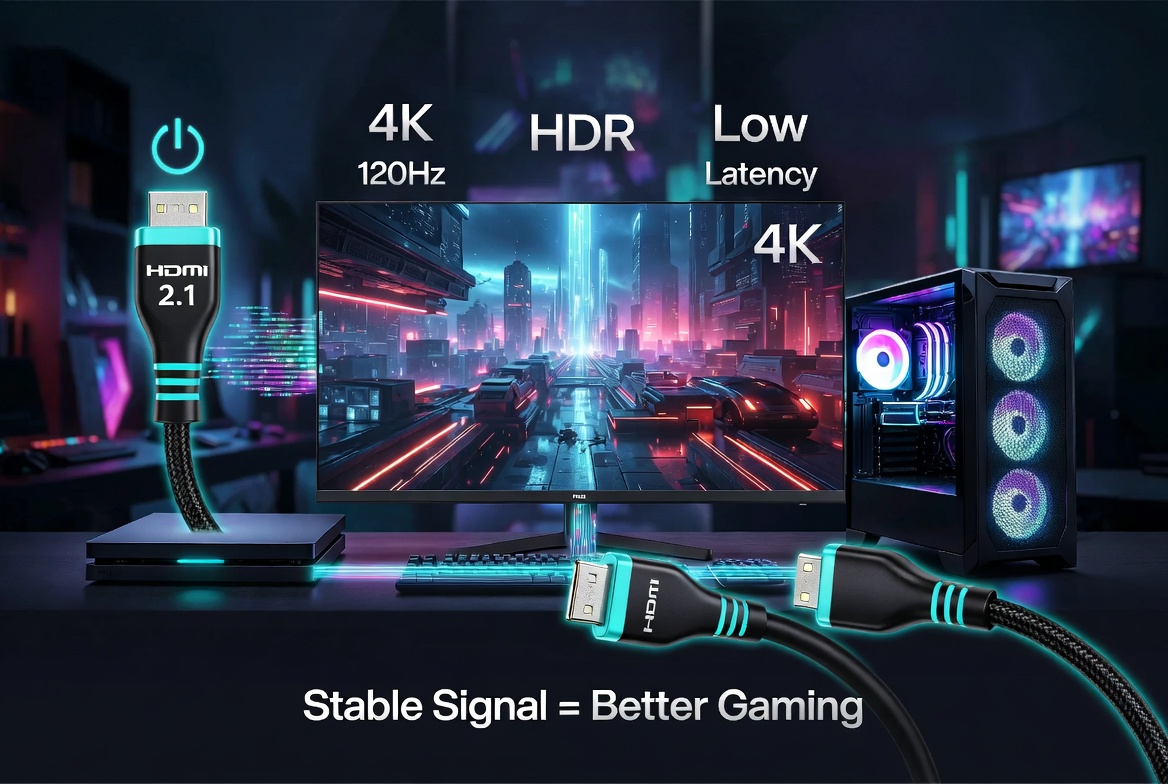
A well-chosen HDMI cable for gaming is not just a simple accessory; it directly impacts frame stability, input latency, HDR performance, and even your future upgrade path across consoles and PCs. Drawing on real gaming use cases and our experience as an OEM/ODM HDMI cable manufacturer, this guide walks you through how to choose, validate, and scale the right cable—from a single gaming setup to global branded product lines. [shervan]
As gaming moves deeper into 4K 120Hz and 8K HDR, the HDMI cable has become a critical part of the performance chain, not just a commodity. In this guide, we combine hands-on engineering experience, market data, and real gamer scenarios to help you choose HDMI cables that unlock the full potential of your PlayStation, Xbox, Nintendo Switch, or high-end gaming PC. [straitsresearch]
Many gamers still believe that "any HDMI cable is fine as long as it displays an image," but this mindset becomes risky once you step into high-refresh 4K, VRR, and competitive online gaming. At higher resolutions and frame rates, a sub‑par cable can introduce intermittent black screens, audio dropouts, or random signal loss that are hard to diagnose during intense play. [xtremecables]
From an engineering perspective, gaming cables are subject to rapid movement, frequent re‑plugging, and tight bends behind monitors and TVs, which can stress cheaper connectors and shielding designs. For brands and distributors, a small weakness in cable design can scale into warranty claims, poor reviews, and higher return rates once products reach global retail or e‑commerce platforms. [9game]
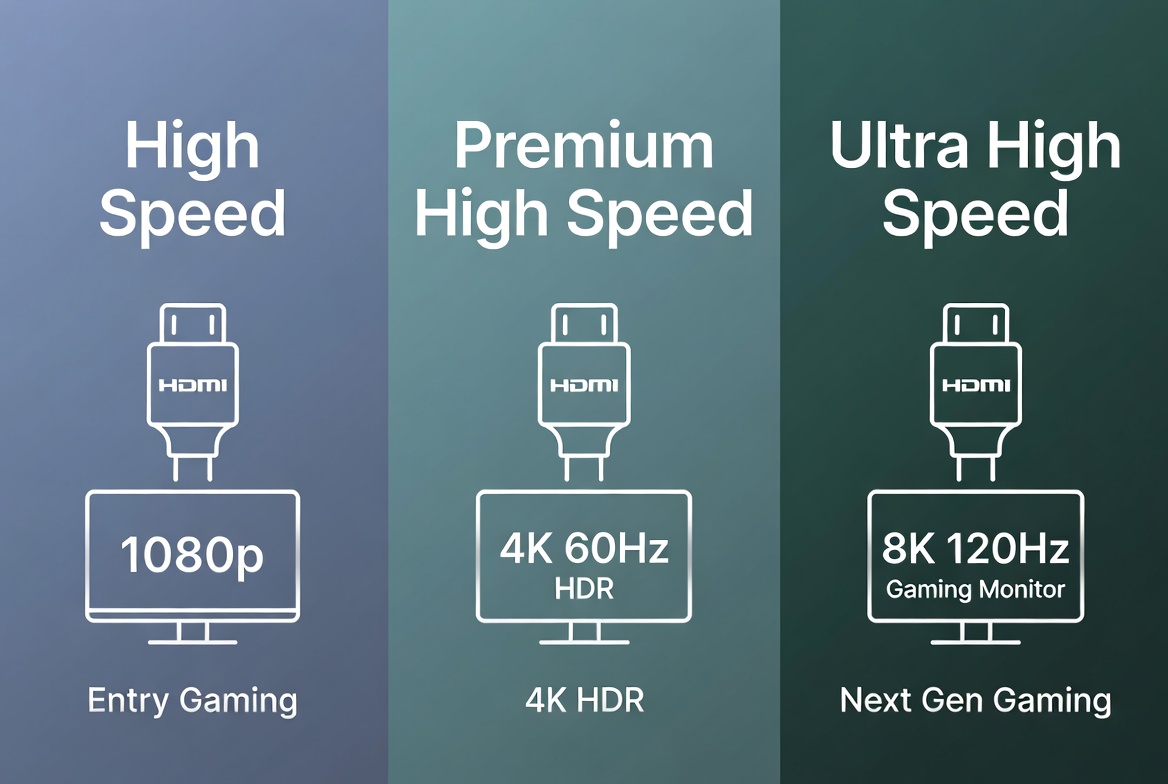
For gaming, the important distinction is between cables designed for HDMI 2.0 performance and those that meet HDMI 2.1 / Ultra High Speed requirements. While marketing labels can be confusing, focusing on bandwidth and certification gives you a more reliable benchmark than version numbers alone. [fycables]
- High Speed / Premium High Speed (up to 18 Gbps):
- Ideal for 1080p high refresh and 4K at up to 60 Hz with HDR on most consoles and PCs. [pcmag]
- Works well for PS4, Xbox One, Nintendo Switch, and many casual 4K setups. [fycables]
- Ultra High Speed (up to 48 Gbps):
- Designed for 4K 120Hz, 8K 60Hz, VRR, ALLM, eARC, and other advanced HDMI 2.1 features. [pcmag]
- Recommended for PS5, Xbox Series X|S, high‑end gaming PCs, and premium 4K/8K TVs and monitors. [fycables]
When we design HDMI cables for gaming brands, we focus on a handful of specs that directly affect in‑game experience. As a gamer or buyer, these same specs help you quickly filter serious products from generic ones: [amzwires]
- Bandwidth:
- 18 Gbps for reliable 4K 60Hz.
- 48 Gbps for 4K 120Hz and 8K 60Hz gaming. [fycables]
- Certification:
- Look for the official "Ultra High Speed HDMI Cable" label on packaging or product pages; this indicates third‑party testing for 48 Gbps workloads. [xtremecables]
- Cable Length:
- Under 3 m (10 ft): standard copper is usually enough.
- Beyond 5 m (16 ft): active or fiber HDMI is often required to maintain stable high‑bandwidth signals. [9game]
- Build Quality:
- Multi‑layer shielding, strain relief, and robust connector housing help cables survive desk setups, wall mounting, and frequent plugging. [amzwires]
If you mainly play story‑driven games at 4K 60Hz on PS4 Pro, Xbox One X, or Nintendo Switch, a well‑built Premium High Speed (18 Gbps) cable is typically sufficient. The priorities here are stable HDR, good shielding against interference, and reasonable length to match your living room layout. [xtremecables]
In this scenario, investing in Ultra High Speed can still be useful if you plan to upgrade your console or TV within the next few years. For distributors and brands, positioning a "4K HDR Ready / Upgrade‑Friendly" cable at this tier captures value‑conscious buyers without over‑engineering. [mordorintelligence]
For PS5, Xbox Series X|S, and high‑end PCs paired with 120 Hz or 144 Hz 4K displays, you should specifically choose an Ultra High Speed HDMI cable advertised for 4K 120Hz. [fycables] Here, higher bandwidth and better signal integrity contribute to lower visual artifacts, smoother motion, and fewer random disconnects during competitive matches. [xtremecables]
Manufacturers serving this segment often add reinforced connectors, thicker jackets, and more durable strain relief, because esports setups involve frequent travel, LAN participation, and rapid reconfiguration. For OEM/ODM buyers, this is an ideal segment for co‑branded, performance‑positioned products with custom color schemes and packaging. [shervan]
If your gaming PC or console sits across the room or in a separate AV cabinet, cable length becomes the main constraint. Once you move beyond 5–7 m at higher resolutions, standard copper cables may struggle to maintain stable signals, especially at 4K 120Hz or 8K. [9game]
In these cases, consider:
- Active HDMI 2.1 cables or hybrid fiber HDMI to preserve bandwidth across long runs. [youtube]
- Directional cables (labeled "Source" and "Display") installed correctly to ensure internal signal boosters function as intended. [xtremecables]
From a product strategy perspective, long‑distance 2.1 cables fit naturally into premium home‑theater or custom‑installation bundles where value and reliability matter more than lowest price. [straitsresearch]
Use this simple checklist before you buy or recommend an HDMI cable for gaming: [9game]
1. Match Your Display and Console/PC
- Confirm your monitor/TV's resolution and refresh rate (e.g., 4K 60Hz vs 4K 120Hz). [pcmag]
- Check whether your console or GPU actually outputs at that refresh rate and supports HDMI 2.1 features. [fycables]
2. Verify Certification and Bandwidth
- For 4K 120Hz or 8K, only choose Ultra High Speed 48 Gbps cables with visible certification badges. [pcmag]
3. Select Appropriate Length
- Keep cables as short as your layout allows to reduce signal loss, especially at high bandwidths. [xtremecables]
4. Evaluate Build and Durability
- Look for braided or thick PVC jackets, gold‑plated connectors, and strain‑relief boots where the cable meets the plug. [amzwires]
5. Check Reviews and Return Policy
- Real user feedback often reveals issues like intermittent flickering, audio dropouts, or incompatibility with specific TV models. [fycables]
| Gaming Scenario | Recommended Cable Type | Key Features to Prioritize |
|---|---|---|
| 1080p / 1440p casual gaming | High Speed HDMI | 10.2–18 Gbps, solid shielding, basic strain relief (pcmag) |
| 4K 60Hz HDR console gaming | Premium High Speed HDMI (18 Gbps) | HDR support, stable long‑term performance (fycables) |
| 4K 120Hz or 8K next‑gen gaming | Ultra High Speed HDMI (48 Gbps) | Certified label, VRR, ALLM, eARC support (fycables) |
| Long‑distance 4K 120Hz or 8K over 5–10 m | Active or Fiber Ultra High Speed HDMI | Signal amplification, directional labeling (xtremecables) |
The global HDMI cable market is steadily expanding, driven by 4K/8K display adoption and gaming growth across both consoles and PCs. Recent market research estimates that the HDMI cable market is growing at around 4–5% CAGR through the early 2030s, with Ultra High Speed segments showing the fastest growth due to high‑frame‑rate gaming requirements. [cognitivemarketresearch]
On the technology side, the ecosystem continues to evolve: newer HDMI specifications and higher‑bandwidth implementations are being introduced to support ultra‑high‑resolution, high‑refresh gaming and emerging esports use cases. For brands and distributors, this means that investing in an optimized HDMI 2.1 gaming line today positions you well for several product cycles ahead. [mordorintelligence]
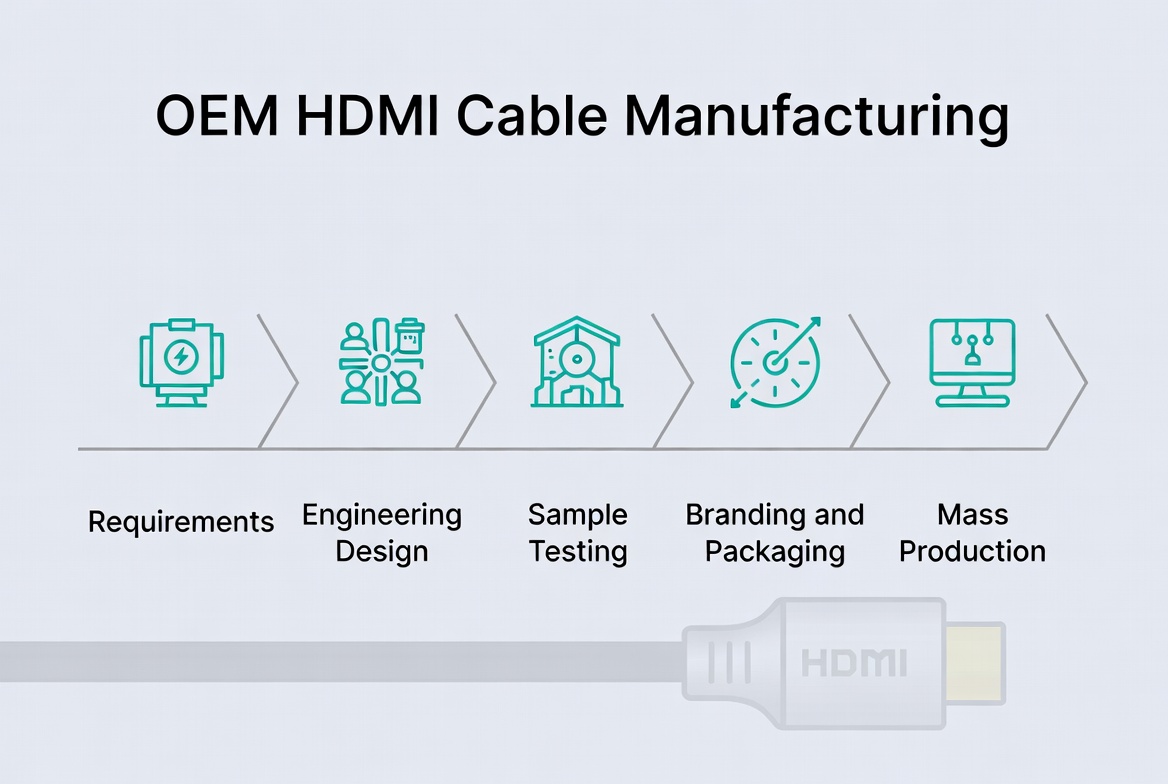
As an HDMI cable OEM/ODM partner, we see a consistent pattern in successful gaming cable projects. Although each brand has its own identity, the technical workflow usually follows these stages: [shervan]
1. Requirements Collection
- Target markets (Amazon, retail, B2B distribution, specialized gaming channels).
- Performance goals (e.g., 4K 120Hz esports, long‑distance home theater). [amzwires]
2. Engineering Design & Material Selection
- Decide between copper vs fiber, shielding layers, connector housings, and jacket styles that align with gaming use cases and budget. [shervan]
3. Sample Production and Stress Testing
- Validate 48 Gbps performance on real consoles/GPUs and gaming displays.
- Perform bending, insertion, and heat tests to simulate real‑world use. [amzwires]
4. Branding, Packaging, and Certification Support
- Implement logo engraving, colored connectors, and gaming‑focused packaging.
- Assist with documentation and marketing assets for channel launch. [shervan]
Based on recent gaming projects, the most requested customizations are practical rather than purely cosmetic. These elements not only help with brand differentiation but also directly influence user experience and product reviews: [shervan]
- Connector Design: Slim housings to fit side‑mounted TV ports; reinforced necks for monitor arms and tight spaces. [9game]
- Cable Form Factor: Braided vs smooth jackets, flat vs round cables, and optional angled connectors for wall‑mounted screens. [9game]
- Length Strategy: SKU planning around the most demanded lengths (e.g., 1 m, 2 m, 3 m, and select long‑run active/fiber options). [xtremecables]
- Brand Story and Documentation: Clear, gamer‑friendly explanations of what "48 Gbps / Ultra High Speed / 4K 120Hz" actually deliver in real gameplay. [fycables]
Once you have the right HDMI cable, a few simple steps can help you avoid the most common performance issues. Use this step‑by‑step process when connecting your console or gaming PC to a TV or monitor: [9game]
1. Use the Correct HDMI Port
- Many TVs and monitors only support HDMI 2.1 bandwidth on specific ports—check the labeling or manual and connect your console/GPU to the HDMI 2.1 / 4K 120 port. [pcmag]
2. Enable High‑Refresh and Game Modes
- On TVs, enable Game Mode, VRR, or 120Hz options in the picture or input settings.
- On PCs, set your display to the maximum supported refresh rate in the OS and GPU control panel. [pcmag]
3. Avoid Excessive Bending and Strain
- Route the cable so it is not sharply bent or pinched behind furniture; tight bends can damage wires and impact signal integrity. [amzwires]
4. Update Firmware on Consoles and TVs
- Modern consoles and TVs often receive updates that improve HDMI 2.1 compatibility, VRR behavior, and HDR handling. [fycables]
5. Diagnose Issues with a Known‑Good Cable
- If you experience flicker or black screens, swap to another certified cable of similar length to isolate whether the issue is cable‑related. [pcmag]
Based on real gamer feedback and support tickets, the same few issues appear over and over, often linked to cabling. Recognizing the symptoms quickly helps you correct them without expensive hardware swaps: [xtremecables]
- Symptom: Random Black Screen During Matches
- Likely cause: Cable at the edge of its bandwidth limit for your resolution/refresh rate or too long for its design.
- Fix: Reduce resolution/refresh or switch to a certified Ultra High Speed cable with a shorter length. [xtremecables]
- Symptom: HDR Looks Washed Out or Too Dim
- Likely cause: TV settings or incompatible combination of HDR mode, chroma subsampling, and cable bandwidth.
- Fix: Enable the correct HDMI enhanced mode on your TV; verify the cable supports the required throughput. [fycables]
- Symptom: Audio Delay or Dropouts Over AV Receivers
- Likely cause: eARC or ARC issues aggravated by marginal cabling.
- Fix: Use a certified Ultra High Speed cable between receiver and TV, and verify eARC settings on both devices. [pcmag]
You do not need to replace every HDMI cable the moment you buy a new console, but certain triggers make an upgrade both logical and cost‑effective. If any of the following applies, moving to a higher‑grade gaming cable is a smart move: [9game]
- You are upgrading from a 60 Hz TV to a 120 Hz 4K gaming monitor.
- You are adding a PS5, Xbox Series X|S, or 8K‑ready GPU to your setup.
- You're planning a long cable run for a wall‑mounted TV or projector.
- You frequently see random flicker, "No Signal" messages, or audio dropouts during gaming sessions.
From a product planning angle, this upgrade cycle is exactly where mid‑range and premium gaming cable lines deliver strong attach rates when bundled with new consoles, monitors, or pre‑built gaming PCs. [straitsresearch]
For gaming brands, wholesalers, and system integrators, partnering with an experienced HDMI cable manufacturer can accelerate product launches and reduce technical risk. Instead of trial‑and‑error with generic cables, a professional OEM/ODM team helps you engineer cables that are tuned to your exact gaming use cases and price points. [shervan]
A capable partner can support you with:
- End‑to‑end project management: from concept and engineering through samples, certification guidance, and mass production. [amzwires]
- Quality control and testing: using gaming‑specific test setups with next‑gen consoles, GPUs, and high‑refresh displays. [amzwires]
- Brandable assets: custom connectors, colors, packaging, and marketing documentation tailored for gaming audiences. [shervan]
If you aim to build a long‑term product line—not just one‑off SKUs—this kind of partnership becomes a strategic advantage in a growing, technically demanding HDMI cable market. [mordorintelligence]
Yes. While cables do not increase your FPS, a cable that cannot reliably handle the required bandwidth can cause flicker, black screens, or forced lower refresh rates, which directly impact how smooth and responsive your games feel. For 4K 120Hz or 8K gaming, a certified Ultra High Speed cable is essential. [xtremecables]
Not necessarily. You mainly need a cable that meets the correct certification and bandwidth requirements for your setup, along with reasonable build quality. Beyond that, ultra‑premium prices often reflect branding or aesthetics rather than measurable in‑game benefits. [pcmag]
Check any labeling on the cable or packaging for "Ultra High Speed" or 48 Gbps indicators, and then test it by enabling 120 Hz in your console or PC and display settings. If you encounter instability, flicker, or the option does not appear, your cable may not reliably support that mode. [9game]
The Nintendo Switch currently targets 1080p and 60 Hz, which does not require HDMI 2.1's full bandwidth. A good High Speed or Premium High Speed cable is enough, though a 2.1 cable can still be useful if you plan to reuse it with next‑gen hardware later. [fycables]
For typical desk or living room setups, 1.5–3 m (5–10 ft) offers a good balance between flexibility and signal reliability. For longer runs, especially at 4K 120Hz or 8K, consider active or fiber HDMI cables designed specifically for high‑bandwidth, long‑distance use. [xtremecables]
1. PCMag – *What You Need to Know About HDMI Cables*
https://www.pcmag.com/news/slaying-the-cable-monster-what-you-need-to-know-about-hdmi-cables [pcmag]
2. F&Y Cables – *Best HDMI Cables for Gaming: Top Picks for Console and PC*
https://fycables.com/best-hdmi-cables-for-gaming-top-picks-for-console-and-pc/ [fycables]
3. Xtreme Cables – *The Ultimate Guide to the Best HDMI Cables for Gaming*
https://xtremecables.com/blogs/tech-guides/level-up-your-gaming-the-ultimate-guide-to-the-best-hdmi-cables-for-gaming [xtremecables]
4. Cognitivemarketresearch – *Global HDMI Cable Market Analysis 2026*
https://www.cognitivemarketresearch.com/hdmi-cable-market-report [cognitivemarketresearch]
5. Straits Research – *HDMI Cable Market Size, Share, Growth, Analysis, Report*
https://straitsresearch.com/report/hdmi-cable-market [straitsresearch]
6. Mordor Intelligence – *HDMI Market Size, Share, Growth & Industry Trends Report*
https://www.mordorintelligence.com/industry-reports/hdmi-market [mordorintelligence]
7. 9game – *游戏电竞HDMI高清线销售报价全景剖析选购与价格波动趋势*
https://www.9game.cn/news/11433204.html [9game]
8. Shervan Electronics – *HDMI Cables Manufacturer*
https://shervan.in/hdmi-cables-manufacturer/ [shervan]
9. Amzwires – *OEM/ODM HDMI Cable Manufacturing: From Drawing to Completion*
https://www.amzwires.com/news/oem-odm-hdmi-cable-manufacturing-from-drawing-to-completion/ [amzwires]
10. Legit Pick (YouTube) – *Best 8K HDMI Cables of 2026*
https://www.youtube.com/watch?v=pkXenQ44K3w [youtube]


