:+86-13726207043
:info@yuxun.com
- All
- Product Name
- Product Keyword
- Product Model
- Product Summary
- Product Description
- Multi Field Search

Views: 222 Author: YUXUN CABLE Publish Time: 2026-06-07 Origin: Site


Content Menu
● HDMI 2.2 vs 2.1: Why This Upgrade Debate Matters in 2025–2026
● HDMI 2.2 and HDMI 2.1 in One Minute
● HDMI 2.2 vs 2.1: Core Specs and Bandwidth
● Resolution, Refresh Rate, and Gaming Experience
>> What HDMI 2.1 Already Delivers
>> Where HDMI 2.2 Starts to Matter
● Audio, Latency, and AV Synchronization
● Cable Design: Ultra High Speed vs Ultra96
● Upgrade Timing: When HDMI 2.1 Is Enough and When 2.2 Is Worth It
>> You Can Stay on HDMI 2.1 If…
>> You Should Plan for HDMI 2.2 If…
● OEM / ODM Strategy: How a Cable Manufacturer Should Position HDMI 2.2 vs 2.1
>> Portfolio Positioning Recommendations
● Practical Selection Guide: How Brands, Distributors, and Integrators Should Decide
● Expert Insight: Risk Management and Future‑Proofing
● How Zhuhai Yuxun Can Support Global OEM / ODM Customers
● Call to Action for OEM / ODM Buyers
HDMI 2.2 almost doubles HDMI 2.1's bandwidth and unlocks extreme 8K/240 Hz and even 16K scenarios, but for most users in 2025–2026 it remains a niche upgrade best suited to cutting‑edge gaming, 8K home theater, and OEMs planning next‑gen displays. [tomsguide]
As someone who advises display and AV brands on content strategy and cable selection, I've watched the HDMI 2.2 vs 2.1 discussion shift from "What is it?" to "Who actually needs it now?". HDMI 2.1 is already capable of 4K 120 Hz and 8K 60 Hz, but HDMI 2.2 pushes bandwidth to 96 Gbps and introduces new sync technologies that were designed for the next wave of ultra‑high‑resolution use cases. [av]
For a cable manufacturer like Zhuhai Yuxun Innovation Technology Co., Ltd., this is not just a spec race; it is a strategic opportunity to position your OEM/ODM HDMI cable lines as "next‑generation ready" for global brands and distributors. The key is to understand where HDMI 2.2 genuinely adds value, and where HDMI 2.1 remains the rational choice. [fycables]
- HDMI 2.1: 48 Gbps bandwidth, 4K 120 Hz, 8K 60 Hz, designed for current‑gen gaming consoles and most 8K consumer TVs. [techly]
- HDMI 2.2: 96 Gbps bandwidth, support for 4K up to 480 Hz, 8K up to 240 Hz, and even 16K with compression, using new Ultra96 certified cables. [hdmiforum]
- Backwards compatibility: HDMI 2.2 cables work with HDMI 2.1 and 2.0 devices but fall back to the lower standard's capabilities. [silklandtech]
- Real‑world status: HDMI 2.2 spec is released, but widespread devices and cables only begin to appear from late 2025 into 2026. [tomsguide]
From an engineering and UX perspective, bandwidth is the heart of the HDMI 2.2 vs 2.1 conversation. [techly]
| Spec aspect | HDMI 2.1 | HDMI 2.2 |
|---|---|---|
| Max bandwidth | 48 Gbps (techly) | 96 Gbps (tomsguide) |
| Typical cable type | Ultra High Speed HDMI (techly) | Ultra96 HDMI cable (acemagic) |
| Typical resolutions | 4K 120 Hz, 8K 60 Hz (techly) | 4K up to 480 Hz, 8K up to 240 Hz, 10K/12K/16K scenarios with DSC depending on implementation (tomsguide) |
| Release window | Widely deployed since late 2010s (techly) | Spec released 2025, devices rolling out late 2025–2026 (tomsguide) |
| Sync features | ALLM, VRR, QFT, QMS, eARC depending on device (techly) | Adds Latency Indication Protocol (LIP) and improved sync for AV systems (acemagic) |
This jump to 96 Gbps gives system designers more headroom for uncompressed video at higher bit depth and refresh rates, reducing reliance on aggressive compression and preserving image quality in demanding scenarios. For OEM buyers of HDMI cables, this bandwidth margin is a future‑proofing signal that matters in RFPs and technical due diligence. [av]
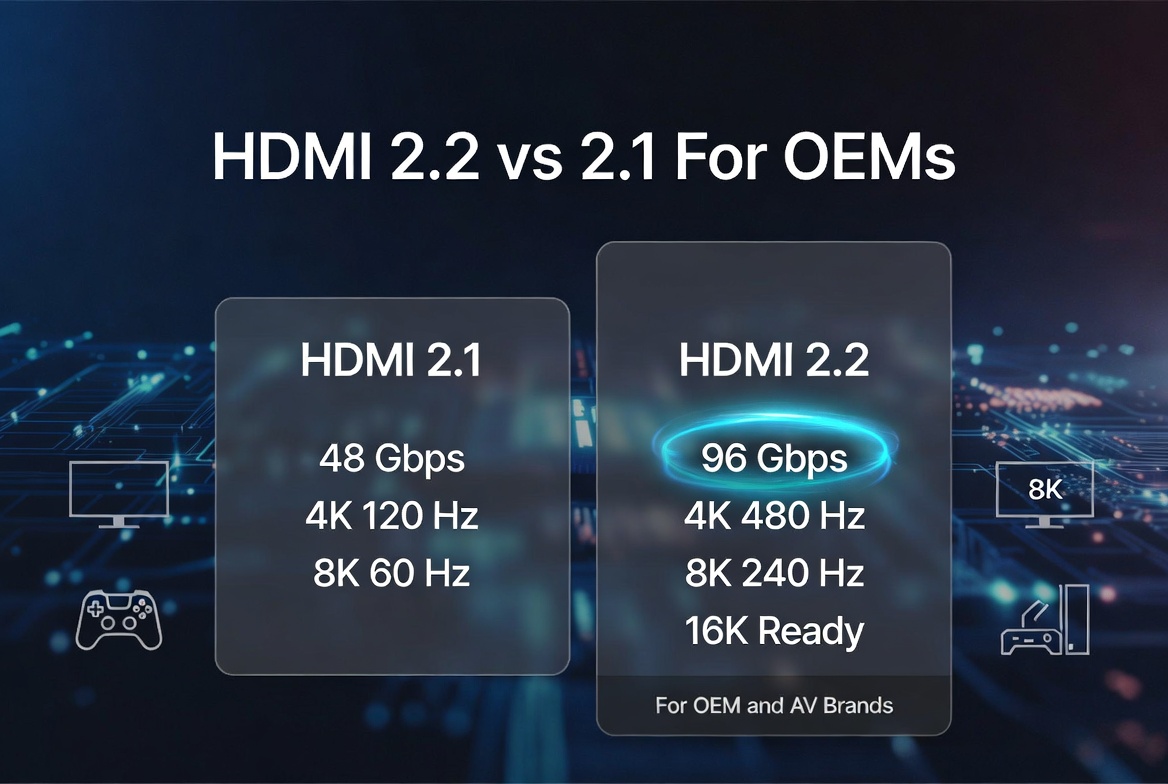
From a user's point of view, the most visible difference between HDMI 2.2 and 2.1 is not the number on the spec sheet, but the smoothness and clarity at extreme resolutions. [techly]
- 4K at 120 Hz for current‑generation consoles and high‑end gaming PCs. [tomsguide]
- 8K at 60 Hz for premium TVs and select content. [av]
- Variable Refresh Rate (VRR), Auto Low Latency Mode (ALLM), and other features that minimize tearing and input lag. [techly]
For most living rooms and gaming setups today, HDMI 2.1 is more than enough. [fycables]
HDMI 2.2 is designed for scenarios where you need higher refresh rates at high resolutions—the sweet spot for next‑gen esports, simulation rigs, and premium 8K home theater. Depending on implementation, HDMI 2.2 can support: [hdmiforum]
- 4K at up to 480 Hz for ultra‑responsive competitive gaming displays. [tomsguide]
- 8K at up to 240 Hz for extreme‑end gaming or pro visualization. [silklandtech]
- 10K/12K/16K combinations with DSC and advanced chroma formats, targeting specialized displays. [hdmiforum]
In practice, this means a smoother motion profile, better motion clarity, and more flexibility for display manufacturers experimenting with 8K 120+ Hz panels and beyond. [av]
While most buyers focus on resolution, HDMI 2.2 also aims to improve audio‑video synchronization, which directly affects perceived quality in home theater and soundbar setups. [acemagic]
- HDMI 2.1 already supports eARC, VRR, and ALLM, which help reduce input lag and ensure richer audio formats. [techly]
- HDMI 2.2 introduces the Latency Indication Protocol (LIP) to enhance coordination between displays, AV receivers, and bars, making it easier for devices to report and correct latency. [163]
For OEMs building high‑end home theater ecosystems, this is a subtle but meaningful shift: fewer lip‑sync complaints, less manual tweaking, and better out‑of‑box experience for premium customers. [163]
For a cable manufacturer, the move from HDMI 2.1 to 2.2 is as much about certification and construction as it is about raw bandwidth. [acemagic]
- Branded as Ultra High Speed HDMI.
- Rated for 48 Gbps and compatibility with 4K 120 Hz and 8K 60 Hz use cases. [av]
- Widely available, with robust ecosystem support and clear testing guidelines. [techly]
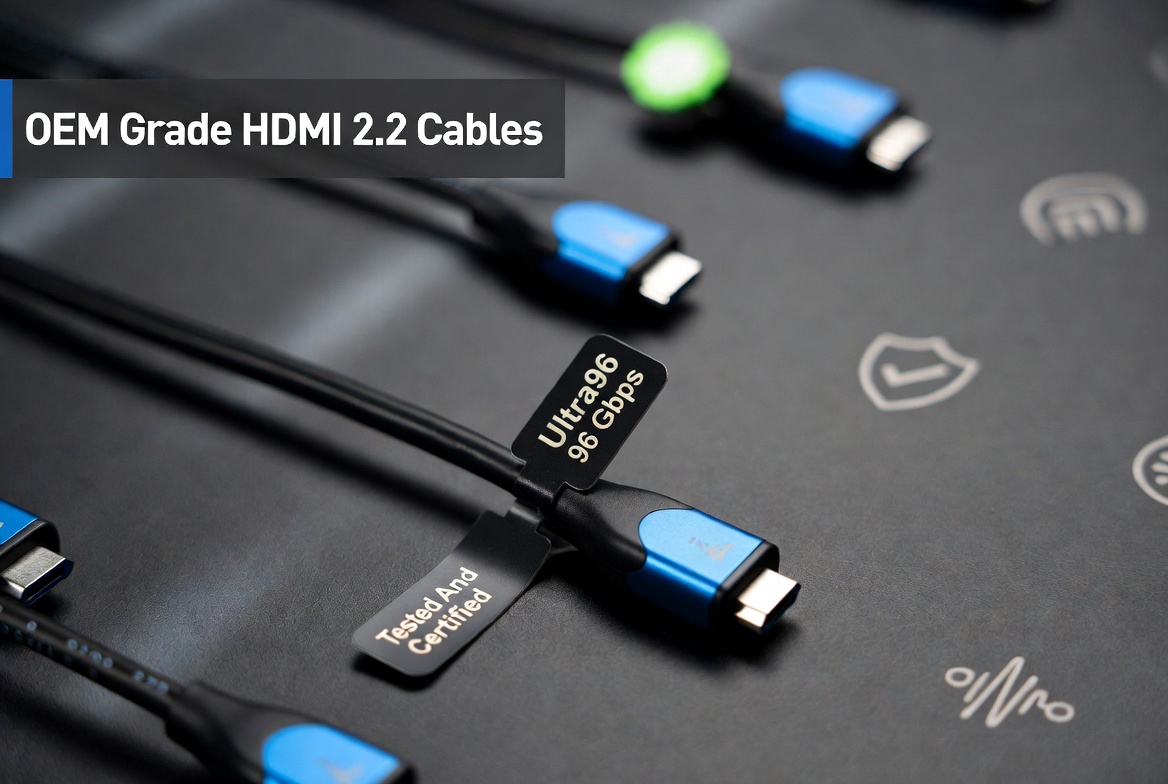
- Use new Ultra96 HDMI cable standards aligned with 96 Gbps throughput. [acemagic]
- Expected to participate in an enhanced HDMI Cable Certification Program, often including holographic labels or QR codes for authenticity and performance verification. [fycables]
- Require tighter control of materials, shielding, and impedance to maintain signal integrity at higher data rates, especially over longer runs. [acemagic]
For global brands vetting suppliers, being able to show third‑party certification, detailed test reports at 96 Gbps, and stable performance at common lengths (e.g., 1–3 m passive, longer active) will be a decisive competitive advantage. [fycables]
From an industry consultant perspective, advising clients on when to upgrade is often more valuable than simply explaining specs. [fycables]
- Your users mostly own 4K TVs/monitors, even high‑end 4K 120 Hz gaming displays. [tomsguide]
- 8K usage is limited to 60 Hz content such as streaming, films, or standard TV feeds. [tomsguide]
- Your product cycles are focused on cost‑optimized mainstream devices through 2026. [fycables]
In these scenarios, HDMI 2.1 cables and ports offer a very strong value‑performance balance, with mature chipsets and broad compatibility. [fycables]
- You are designing flagship 8K or 8K+ displays targeting 120 Hz or above. [silklandtech]
- Your roadmap includes next‑gen consoles or GPUs positioned for 8K/120 Hz or 4K/240+ Hz gaming. [silklandtech]
- You serve the professional visualization, simulation, or virtual production markets where ultra‑high refresh and bit depth matter. [hdmiforum]
For these high‑end segments, HDMI 2.2 is less about today's installed base and more about future differentiation and marketing credibility. [hdmiforum]
From the standpoint of Zhuhai Yuxun Innovation Technology Co., Ltd., the question is not "HDMI 2.2 or 2.1?", but "How do we structure our portfolio to serve both mainstream and next‑gen demand?". [fycables]
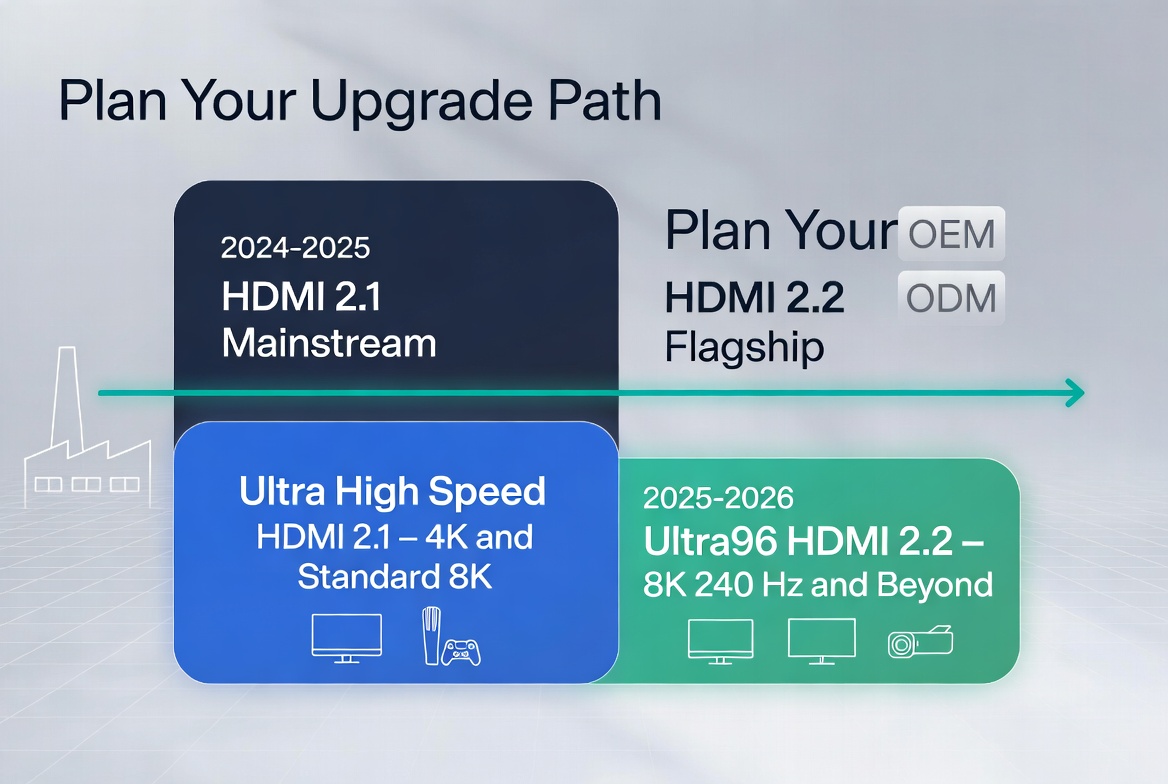
- Maintain a strong line of Ultra High Speed HDMI 2.1 cables as the default option for 4K and standard 8K applications through at least 2026. [fycables]
- Launch a dedicated Ultra96 HDMI 2.2 series positioned as "8K/240 Hz & 16K‑ready", clearly communicating 96 Gbps capability and future‑proofing benefits. [acemagic]
- Offer co‑branding and custom labeling for international brands, allowing them to market the HDMI 2.2 cables under their own premium product lines while relying on your manufacturing and testing expertise. [fycables]
By framing HDMI 2.2 as a strategic upsell option for high‑end SKUs and HDMI 2.1 as the cost‑optimized workhorse, you help OEM clients design clearer product tiers and price ladders. [fycables]
To support your B2B customers, it helps to give them a simple, practical framework for choosing between HDMI 2.2 and 2.1 cables. [silklandtech]
1. Identify target resolution and refresh rate
- If the product is limited to 4K 60/120 or 8K 60, HDMI 2.1 usually suffices. [av]
- If the roadmap includes 8K 120+ or extreme 4K 240+ gaming, HDMI 2.2 becomes relevant. [hdmiforum]
2. Define market positioning
- Mid‑range / mainstream: emphasize proven HDMI 2.1 performance and cost‑efficiency. [fycables]
- Flagship / halo products: pair with HDMI 2.2 cabling to signal cutting‑edge performance and future‑proofing. [silklandtech]
3. Consider ecosystem and launch timing
- If devices will launch before HDMI 2.2 displays are common in your region, you may ship with HDMI 2.1 cables but validate HDMI 2.2 compatibility. [tomsguide]
- For 2026+ launches in premium segments, bundling HDMI 2.2 cables can be a differentiating feature. [av]
4. Evaluate certification and support
- Always recommend certified Ultra High Speed or Ultra96 HDMI cables from reputable manufacturers to minimize returns and support issues. [acemagic]
This type of clearly structured guidance is exactly what international distributors and brand owners look for in their supplier documentation and content assets. [fycables]
From a risk perspective, HDMI 2.2 is both an opportunity and a potential headache if not managed correctly. [163]
- Supply chain and compatibility risk: Early HDMI 2.2 deployments must be validated carefully across chipsets, displays, and AVRs, as ecosystem maturity lags behind HDMI 2.1. [163]
- Marketing vs reality: Over‑promising on 8K/240 Hz or 16K support without clear caveats (panel capability, content availability, cable length limitations) can damage brand trust. [silklandtech]
- Balanced roadmap: Maintaining robust HDMI 2.1 lines while gradually introducing HDMI 2.2 variants protects your clients from being forced into premature upgrades. [fycables]
For a manufacturer with strong OEM/ODM experience, the winning strategy is to lead on HDMI 2.2 know‑how while still recommending HDMI 2.1 whenever it is the more rational, cost‑effective choice for the end user. [fycables]
Positioning your company as a solution partner, not just a cable factory, is key in the HDMI 2.2 vs 2.1 era. [fycables]
You can add value for overseas brands, wholesalers, and device manufacturers by:
- Providing technical consultation on HDMI 2.2 vs 2.1 selection during product planning. [silklandtech]
- Offering custom lengths, connectors, and jacket materials optimized for different application scenarios (gaming monitors, soundbars, projectors, in‑wall installations). [fycables]
- Delivering full documentation: bandwidth test reports, eye‑diagram results, and certification evidence for both Ultra High Speed and Ultra96 lines. [acemagic]
This consultative approach not only strengthens long‑term relationships but also differentiates your brand in a crowded HDMI cable market.
If you are planning your next‑generation TV, monitor, projector, or AV product line and want to balance cost, performance, and future‑proofing, partnering with a specialized HDMI cable manufacturer is critical. Reach out to Zhuhai Yuxun Innovation Technology Co., Ltd. to discuss tailored HDMI 2.1 and HDMI 2.2 cable solutions, including OEM branding, Ultra96‑grade designs, and certification support for your global launches. [fycables]
Q1. Is HDMI 2.2 backwards compatible with HDMI 2.1 and 2.0 devices?
Yes. HDMI 2.2 cables and ports are designed to be backwards compatible, so you can connect them to HDMI 2.1, 2.0, and even older devices, but performance will be limited to the lower standard. [hdmiforum]
Q2. Do I need new cables to enjoy HDMI 2.2 features?
To access full 96 Gbps bandwidth and the highest resolutions and frame rates, you need Ultra96 HDMI 2.2 cables; older High Speed or Ultra High Speed cables will not reliably support these extreme modes. [acemagic]
Q3. Is HDMI 2.1 enough for console gaming?
For current‑generation consoles and most PC gaming setups, HDMI 2.1 is typically enough, providing 4K 120 Hz, VRR, and low‑latency features that deliver an excellent gaming experience. [techly]
Q4. When will HDMI 2.2 devices become common?
The HDMI 2.2 specification was released in 2025, with first compatible TVs, monitors, and cables expected from late 2025 into 2026 and beyond; broader adoption will likely take several product cycles. [tomsguide]
Q5. How should OEMs and brands plan their HDMI roadmap?
Most brands should continue to rely on HDMI 2.1 for mainstream 4K and 8K products while introducing HDMI 2.2 in flagship SKUs that target advanced gaming and high‑end home theater, leveraging reputable OEMs for certified Ultra96 cables. [av]
1. HDMI Forum – Specifications Overview (including HDMI 2.2). [https://hdmiforum.org/specifications/] [hdmiforum]
2. AV.com – "HDMI 2.2 vs. 2.1" (bandwidth, resolutions, and feature comparison). [https://www.av.com/blog/hdmi-2-2-vs-2-1/] [av]
3. Tom's Guide – "HDMI 2.1 vs HDMI 2.2: Biggest differences explained and when you should upgrade". [https://www.tomsguide.com/tvs/hdmi-2-1-vs-hdmi-2-2-biggest-differences-explained-and-when-you-should-upgrade] [tomsguide]
4. Fycables – "HDMI 2.2 vs 2.1: 2025 Upgrade Guide". [https://fycables.com/hdmi-2-2-vs-2-1-2025-upgrade-guide/] [fycables]
5. ACEMagic – "HDMI 2.1 vs HDMI 2.2: What You Need to Know". [https://acemagic.com/blogs/accessories-peripherals/hdmi-2-2-vs-hdmi2-1] [acemagic]
6. Techly – "HDMI 2.0 and 2.1 Cables: differences and upgrade guide" (for HDMI 2.1 baseline). [https://www.techly.com/blog/hdmi-cables-differences-and-upgrade-guide] [techly]
7. AV / HDMI industry article (Chinese) discussing HDMI 2.2 adoption and LIP in home theater. [https://www.163.com/dy/article/JSRR4RT90511CPMT.html] [163]
8. Silkland – "HDMI 2.2 vs 2.1 Comparison: Is 96Gbps Worth the Upgrade". [https://silklandtech.com/blogs/news/hdmi-2-2-vs-2-1] [silklandtech]


