:+86-13726207043
:info@yuxun.com
- All
- Product Name
- Product Keyword
- Product Model
- Product Summary
- Product Description
- Multi Field Search

Views: 222 Author: YUXUN CABLE Publish Time: 2026-06-06 Origin: Site


Content Menu
● What Really Changes Between HDMI 1.4, 2.0 and 2.1?
● HDMI 1.4: Still Relevant, But Only for Legacy Setups
>> Where HDMI 1.4 still makes sense
>> Key limitations you must consider
● HDMI 2.0: The 4K Workhorse for 90% of Use Cases
>> Why HDMI 2.0 became the mainstream standard
>> Ideal applications for HDMI 2.0 cables
● HDMI 2.1: Future‑Proofing for 8K and High‑Refresh Gaming
>> What HDMI 2.1 brings to the table
>> Engineering and manufacturing implications
● From a User's Perspective: Which HDMI Version Do You Really Need?
● Expert OEM / ODM Insights: How Brands Should Specify HDMI Cables
>> Specify bandwidth first, version second
>> What professional buyers should ask from a factory
● Cable Length, Material, and Real‑World Performance (Often Overlooked)
>> Why length and construction matter
● Future Trends: HDMI 2.1 Today, HDMI 2.2 Tomorrow?
● How Zhuhai Yuxun Innovation Technology Can Help Global Brands
● Practical Buying Guide: Matching Version to Scenario
● Call to Action: Partner With an OEM/ODM HDMI Specialist
● FAQ
HDMI 2.1 vs 2.0 vs 1.4 is no longer just a "spec sheet" question—it decides whether your users see basic HD, smooth 4K, or next‑gen 8K and 4K 120 Hz gaming, and whether your brand wastes money on over‑spec cables. As an OEM/ODM HDMI cable manufacturer like Zhuhai Yuxun Innovation Technology Co., Ltd., choosing and positioning the right HDMI versions is also a strategic decision that affects yield, certification cost, and long‑term customer trust. [sct-supply]
From a practical, real‑world standpoint, HDMI version differences come down to bandwidth, resolution & refresh rate, and advanced features such as VRR, ALLM and eARC. [fycables]
| Feature | HDMI 1.4 | HDMI 2.0 | HDMI 2.1 |
|---|---|---|---|
| Max bandwidth | 10.2 Gbps (fycables) | 18 Gbps (sct-supply) | 48 Gbps (fycables) |
| Typical max resolution/refresh | 4K @ 30 Hz (fycables) | 4K @ 60 Hz (sct-supply) | 8K @ 60 Hz, 4K @ 120 Hz (fycables) |
| 1080p gaming | 60 Hz (fycables) | 120 Hz (fycables) | 240 Hz (1440p) / very high 1080p (fycables) |
| HDR support (typical) | Limited / basic (acemagic) | HDR10, wider color (sct-supply) | Dynamic HDR (benq) |
| Gaming features (VRR, ALLM, QMS, QFT) | No (fycables) | Very limited / vendor specific (sct-supply) | Full spec in standard (fycables) |
| Audio return | ARC (fycables) | ARC / some eARC impl. (benq) | eARC as a headline feature (fycables) |
For end users, HDMI 1.4 is "legacy HD", HDMI 2.0 is the mainstream 4K standard, and HDMI 2.1 unlocks premium 4K 120 and 8K experiences. [benq]
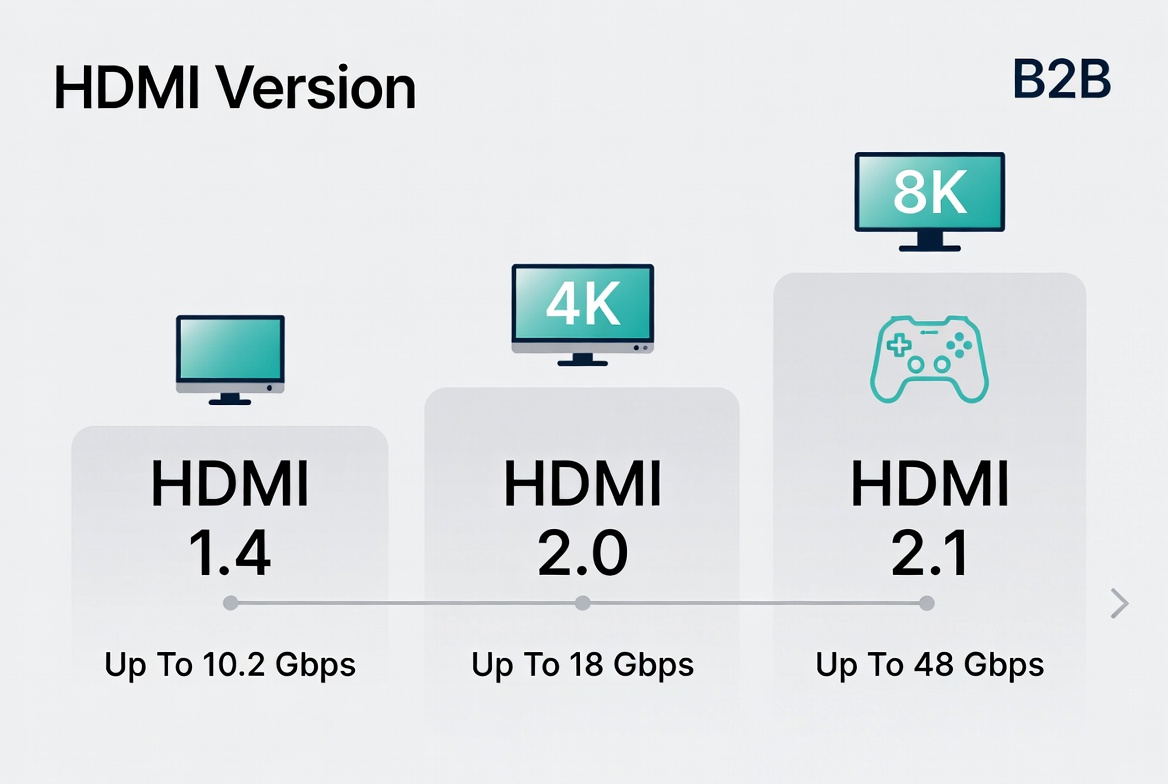
From my experience working with both consumer brands and B2B integrators, HDMI 1.4 has moved into a very specific, cost‑sensitive niche. It's no longer the default for new designs, but it still matters where devices and displays are locked to 1080p or basic 4K. [acemagic]
- Legacy 1080p displays and projectors in education, hospitality, and older meeting rooms. [fycables]
- Cost‑driven set‑top boxes, DVD/Blu‑ray players and simple signage players aimed at Full HD output. [powersync.com]
- OEM accessory bundles where the display's maximum spec is known to be 1080p/60 and product managers are under strong BOM pressure. [electronics.alibaba]
In these scenarios, paying for HDMI 2.0 or 2.1 bandwidth that can never be used is pure margin leakage for brands and distributors.
- 4K capped at 30 Hz makes UIs feel sluggish and unsuitable for modern 4K content or gaming. [acemagic]
- No standardized HDR, VRR, or advanced audio features means a visibly "older" experience on modern panels. [benq]
- Increasing content platforms assume 4K/60 as a baseline, making 1.4 look outdated in comparison. [valerion]
For an OEM/ODM factory, HDMI 1.4 is now a defensive, low‑cost option to support long‑tail legacy customers, not a future‑proof flagship line.
Most of the brands I support still build their volume products around HDMI 2.0, because it delivers full 4K/60 performance without the cost and complexity of 2.1. [sct-supply]
- Supports 4K at 60 Hz, which is the current streaming and living‑room standard. [sct-supply]
- Provides up to 18 Gbps bandwidth, almost double 1.4, enabling richer color spaces and improved HDR. [valerion]
- Works perfectly for Netflix, Disney+, Blu‑ray, and last‑gen consoles (PS4 Pro, Xbox One X) without paying for 8K or 4K 120. [fycables]
In other words, HDMI 2.0 hits a sweet spot of performance vs cost, both for consumers and for procurement teams.
- 4K smart TVs, streaming boxes, STBs and media players focused on cinema and TV content. [benq]
- Corporate meeting rooms and UC systems that output 4K/30–60 slide decks, dashboards, and conferencing video. [powersync.com]
- Mid‑range gaming PCs and older consoles that do not need 4K @ 120 Hz but benefit from stable 4K/60. [juicedsystems]
For a manufacturer like Zhuhai Yuxun Innovation Technology, HDMI 2.0 cables should form the backbone of your catalog, with multiple lengths, jacket types, and packaging SKUs to match different markets. [fycables]
From a professional perspective, HDMI 2.1 is where visual experience and cable engineering both get serious. It nearly triples the maximum bandwidth of HDMI 2.0 to 48 Gbps, which enables very high resolutions and refresh rates. [juicedsystems]
- 8K @ 60 Hz and 4K @ 120 Hz, with some implementations going beyond. [juicedsystems]
- Support for Dynamic HDR, where brightness and color adapt scene by scene or even frame by frame. [benq]
- Gaming‑focused features such as Variable Refresh Rate (VRR), Auto Low Latency Mode (ALLM), and Quick Frame Transport (QFT) to reduce tearing and lag. [sct-supply]
- eARC, a more robust Audio Return Channel that supports uncompressed, high‑bitrate audio formats for home theater. [fycables]
This is why Ultra High Speed HDMI 2.1 cables are now standard recommendations for PS5, Xbox Series X and high‑end 4K/8K TVs. [valerion]
From the factory side, supporting full‑spec HDMI 2.1 means:
- Designing cables to handle 48 Gbps over realistic lengths, which increases stress on materials and geometry. [juicedsystems]
- More stringent signal integrity tests (insertion loss, return loss, jitter) and a much tighter QA process. [electronics.alibaba]
- A strong need for official Ultra High Speed HDMI certification to avoid returns and reputational damage when used with 4K/120 or 8K setups. [electronics.alibaba]
For OEM/ODM clients, the message is clear: HDMI 2.1 is not just a marketing logo; it is a genuine engineering upgrade that must be backed by lab data and certification.
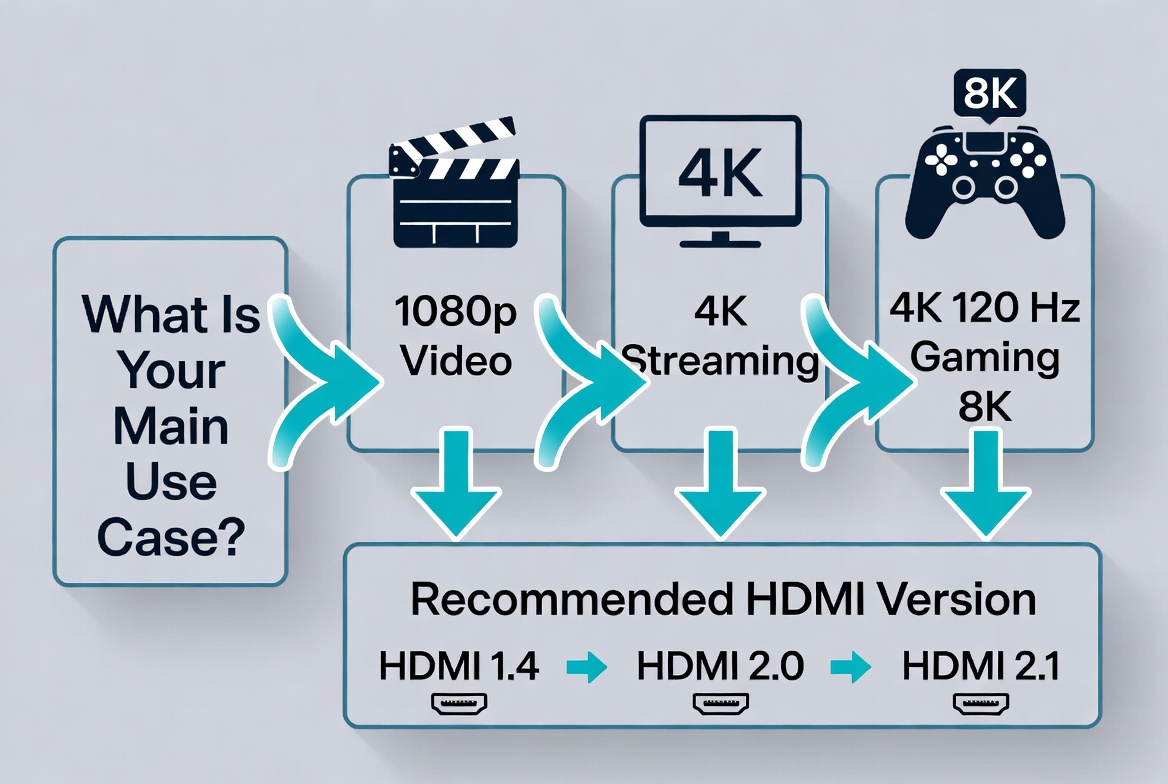
When I talk with AV integrators and international distributors, the most helpful approach is to frame HDMI choice by use case, not by spec sheet alone. [electronics.alibaba]
- High‑end gamer with PS5/Xbox Series X and 120 Hz 4K TV
Go HDMI 2.1 (Ultra High Speed). Anything less leaves features on the table and risks screen tearing. [valerion]
- 8K TV owner or premium home theater installer
Choose HDMI 2.1 to ensure 8K support and eARC‑based immersive audio. [fycables]
- 4K streaming user (Netflix, Disney+, Apple TV) on a standard 60 Hz TV
HDMI 2.0 is enough, and upgrading to 2.1 usually brings no visible benefit. [sct-supply]
- 1080p or older display, office projector, or legacy signage
HDMI 1.4 is still fine, and often the most cost‑effective choice. [acemagic]
As an OEM/ODM‑focused manufacturer, Zhuhai Yuxun Innovation Technology sits at the intersection of engineering constraints and marketing promises. Helping foreign brands pick the right HDMI version is not just service; it's a competitive advantage. [fycables]
Professional wholesale guides now recommend defining required bandwidth in Gbps before locking in the HDMI version. [electronics.alibaba]
- For mainstream 4K/60 products, specifying 18 Gbps ensures HDMI 2.0‑class performance. [acemagic]
- For 4K/120 or 8K designs, you must target 48 Gbps and require Ultra High Speed‑grade cables. [benq]
This avoids the mistake of overpaying for HDMI 2.1 where 2.0 is sufficient, or under‑specifying cables that fail under real loads. [benq]
A serious HDMI cable OEM/ODM relationship should include:
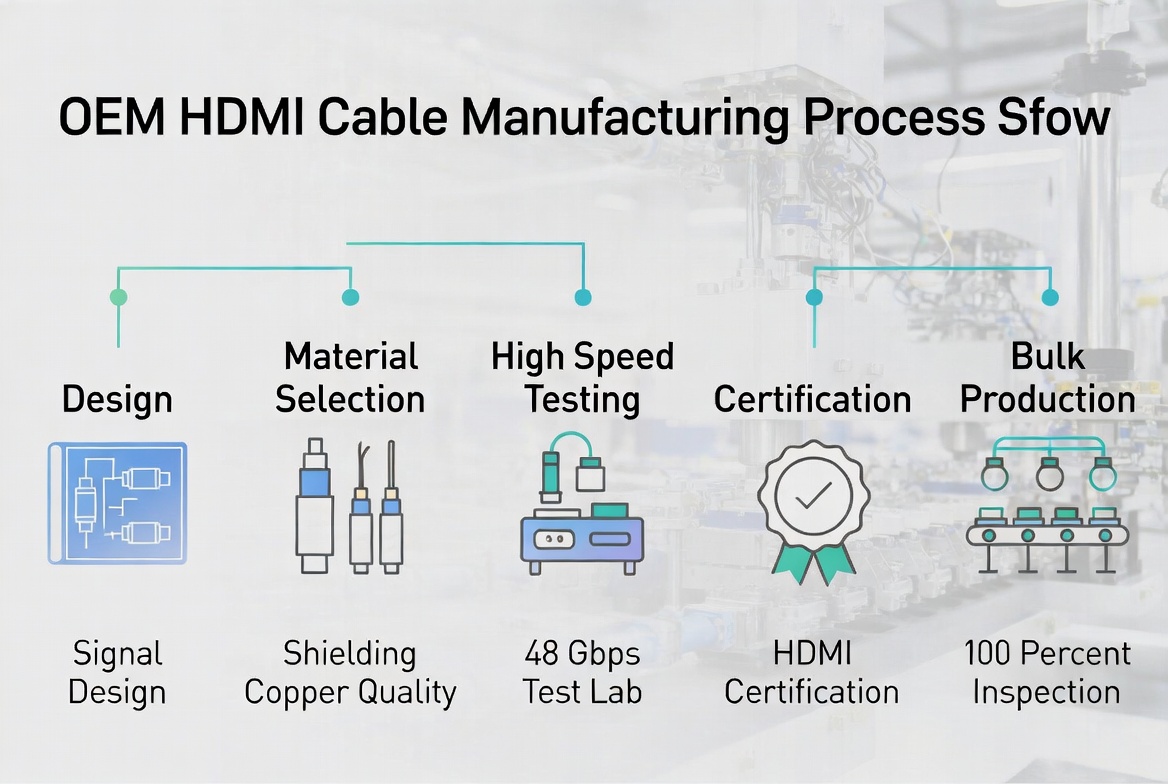
- Electrical test reports, including insertion loss, return loss, and jitter, not only a "meets HDMI spec" claim. [electronics.alibaba]
- Clear documentation of HDMI Licensing certification or recognized third‑party validation for Premium High Speed and Ultra High Speed cables. [powersync.com]
- Evidence of ISO9001‑level quality systems and 100% mass‑production inspection, which factories like leading HDMI manufacturers now emphasize. [fycables]
- A definition of acceptable failure rate in the field (often under 1–1.5%) and how QA is set up to meet it. [electronics.alibaba]
Zhuhai Yuxun Innovation Technology can differentiate itself by packaging these technical assets into easy‑to‑use sales collateral and spec sheets for its global partners. [fycables]
In real deployments, I often see problems blamed on "bad HDMI version" when the root cause is cable length, construction, or lack of certification. [powersync.com]
- For full‑fat HDMI 2.1 (48 Gbps), practical copper cable length is often limited to around 3 meters for guaranteed reliability; longer runs may need active or optical solutions. [valerion]
- Poor shielding and twisted‑pair geometry can pass low‑bandwidth 1080p, but fail intermittently at 4K/60 and completely at 4K/120. [powersync.com]
- Marketing claims like "100% gold plating" are largely cosmetic; professional guides flag this as misleading, since effective plating is typically a thin gold layer over nickel for durability. [electronics.alibaba]
Manufacturers that explain these realities openly build long‑term trust with distributors and installers, especially in B2B channels.
Looking slightly ahead, industry discussions and trade‑show demos indicate an upcoming HDMI 2.2 standard with even higher bandwidth and new cable requirements, though it is not yet mainstream. [kordz]
- Early commentary suggests targets around 96 Gbps raw bandwidth, potentially validated under a new "Ultra96"‑style certification, but no mass‑market products exist yet. [graniteriverlabs]
- Industry guidance is to avoid overpromising on HDMI 2.2 until the spec and certification ecosystem are stable; instead, manufacturers should focus on solid HDMI 2.1 implementations. [pcmag]
Positioning your catalog as "HDMI 2.1‑ready today, 2.2‑aware for tomorrow" is a credible, low‑risk narrative for international buyers.
As a dedicated HDMI and cable manufacturer, Zhuhai Yuxun Innovation Technology can provide OEM and ODM HDMI 1.4, 2.0, and 2.1 cables tailored to global brands, wholesalers, and device makers. [fycables]
Potential value propositions to highlight in your content and sales materials:
- Custom‑engineered HDMI 2.1 solutions for 8K TVs, gaming consoles, and premium home theater, built to pass ultra‑high‑speed compliance tests. [fycables]
- High‑volume HDMI 2.0 production as a cost‑optimized choice for 4K streaming devices, STBs, and monitors. [acemagic]
- Legacy HDMI 1.4 lines for 1080p projects, bundled accessories, and price‑sensitive OEM kits. [acemagic]
- Strict factory QA processes under ISO‑style systems, with 100% continuity and shielding tests and optional high‑frequency sampling to meet international distributor expectations. [fycables]
By embedding these points into your English content, landing pages, and spec sheets, you align technical depth with clear buying guidance for your overseas partners.
To make all of this instantly usable for your readers, you can summarize the decision logic in a simple matrix.
| User / Project Type | Recommended HDMI Version | Key Reason |
|---|---|---|
| Casual 1080p TV, older projector | HDMI 1.4 (fycables) | Meets Full HD needs at lowest cost |
| Budget 4K TV, streaming box | HDMI 2.0 (sct-supply) | Stable 4K/60 streaming, no need for 4K/120 or 8K |
| Office 4K displays and meeting rooms | HDMI 2.0 (sct-supply) | Sharp 4K dashboards and video conferences at 60 Hz |
| Next‑gen console gamer (PS5/Xbox Series X) | HDMI 2.1 (fycables) | 4K/120, VRR, ALLM for smooth gameplay |
| 8K TV owner / premium home theater | HDMI 2.1 (fycables) | 8K support, Dynamic HDR, eARC |
| Long‑term flagship device design | HDMI 2.1 (fycables) | Future‑proof for upcoming content and refresh rate expectations |
Encouraging readers to identify their real‑world scenario first significantly improves satisfaction and reduces mismatched cable purchases. [valerion]
Choosing between HDMI 1.4 vs 2.0 vs 2.1 is not only a technical decision; it is a business decision that shapes your product roadmap, return rates, and customer experience across markets. [sct-supply]
If you are a TV brand, set‑top box provider, gaming accessory company, or AV integrator looking for a long‑term HDMI cable partner, consider working with an OEM/ODM manufacturer like Zhuhai Yuxun Innovation Technology Co., Ltd. that understands both the engineering requirements and the global channel realities. [fycables]
Reach out with your required bandwidth, target customers, and preferred cable lengths, and we can recommend a tailored mix of HDMI 1.4, 2.0, and 2.1 cables that balances performance, cost, and reliability for your market.
Q1: Do I need HDMI 2.1 if my TV is only 60 Hz but supports 4K?
If your TV is 4K/60 only, HDMI 2.0 is usually enough, and HDMI 2.1 will not deliver a visible upgrade for streaming or standard video use. [sct-supply]
Q2: Will an HDMI 2.0 cable work with an HDMI 2.1 device?
Yes, HDMI is backward compatible, but you will be limited to 2.0‑level features, so 4K/120, full VRR, or 8K modes may not work. [juicedsystems]
Q3: Is there any scenario where HDMI 1.4 is still recommended for new purchases?
Only for strictly 1080p environments or ultra cost‑sensitive bundles where 4K will not be used; otherwise, 2.0 offers far better future flexibility. [powersync.com]
Q4: How do I know if an HDMI 2.1 cable is really certified?
Look for the official Ultra High Speed HDMI label and QR code, and buy from suppliers who provide test and certification reports on request. [fycables]
Q5: Should brands already plan for HDMI 2.2 cables?
For most products, it is still too early; standards and certification are evolving, and no mainstream 2.2 devices are shipping yet, so HDMI 2.1 remains the practical high‑end choice. [kordz]
1. SCT Supply – *HDMI Versions Explained: A 2025 Guide for AV Professionals and Enthusiasts* (HDMI 2.0 vs 2.1 overview, 4K/60 and VRR context). [sct-supply]
2. FYcables – *HDMI 2.1 vs 2.0 vs 1.4: Comparison & Buying Guide* (bandwidth, resolution table, version use‑case guidance). [fycables]
3. BenQ – *When Do I Need HDMI 2.1 or Is HDMI 2.0 Sufficient?* (bandwidth differences, 48 Gbps vs 18 Gbps, feature explanations). [benq]
4. ACEMAGIC – *HDMI 1.4 vs. 2.0: What's the Difference and How to Choose* (HDMI 1.4 and 2.0 bandwidth and 4K performance). [acemagic]
5. Alibaba Electronics – *Wholesale OEM HDMI Cable Guide: How to Choose Right* (OEM/ODM guidance, testing and QC recommendations). [electronics.alibaba]
6. Kordz – *The Future of HDMI 2.2 and Beyond: What It Means for the AV Industry* (HDMI 2.2 projections and adoption timeline). [kordz]
7. Valerion – *HDMI Cables Explained: 1.4 vs. 2.0 vs. 2.1 & Connector Types* (bandwidth summary and role of HDMI 2.1 for 4K and 8K). [valerion]
8. Powersync – *HDMI 1.4 vs 2.0 vs 2.1 – Version Differences Overview* (practical buying tips and usage by resolution). [powersync.com]
9. Juiced Systems – *HDMI 2.1 vs HDMI 2.0: Specs, Resolutions, and Differences* (refresh rates like 1440p/240 Hz and 4K/120). [juicedsystems]
10. FYcables – *HDMI Cables Manufacturer – Factory Capabilities and Certifications* (factory QC and certification practices). [fycables]
11. PCMag – *Next Version of HDMI to Use New, Higher‑Capacity Cable* (HDMI Forum announcements around next‑gen HDMI). [pcmag]
12. Granite River Labs – *HDMI 2.2 Specification Technical Validation and Market Potential* (technical and market notes on future HDMI). [graniteriverlabs]


